The Complete Guide To Invoking Serverless Oracle Functions

I have blogged quite a bit about serverless Oracle Functions here on this blog, including several various examples about function invocation. But, I’ve never put together a comprehensive guide that includes examples of the various ways to invoke your serverless functions in the Oracle Cloud. In this post, we’ll look at all of the possible ways (as of the time this post was published) to call your serverless functions.
For your navigational convenience, I’ve included a handy table of contents with hyperlinks to the various sections within this blog post.
Getting Function Metadata
Before you can invoke your function, you’ll first want to collect some information about it. We’ll assume that you already know the function name and the name of the application that your function is deployed to, but other than that we’ll assume that you have not collected any other information. In the examples below, we’ll use the following information. The placeholder that is used for the data throughout this post is shown in [brackets].
- Function Name [function-name]
- Function Application Name [application-name]
- Function OCID [function-ocid]
- Function Invoke Endpoint **[invoke-endpoint] **(you may need to derive this from **[invoke-endpoint-base-url] **depending on collection method).
Let’s look at a few ways you can collect this information.
Via the Fn CLI
In my opinion, the quickest and easiest way to collect this information is to run the following command via the Fn CLI:
$ fn inspect function [application-name] [function-name]For example:
$ fn inspect function hello-world-app hello-world-fnThe result of this command will be a JSON object containing function metadata.
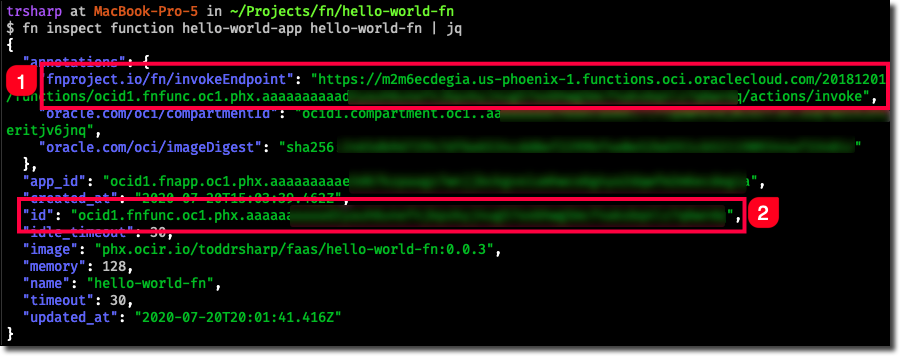
In the example above, (1) contains our [invoke-endpoint] and (2) contains our [function-ocid].
Via the Console Dashboard
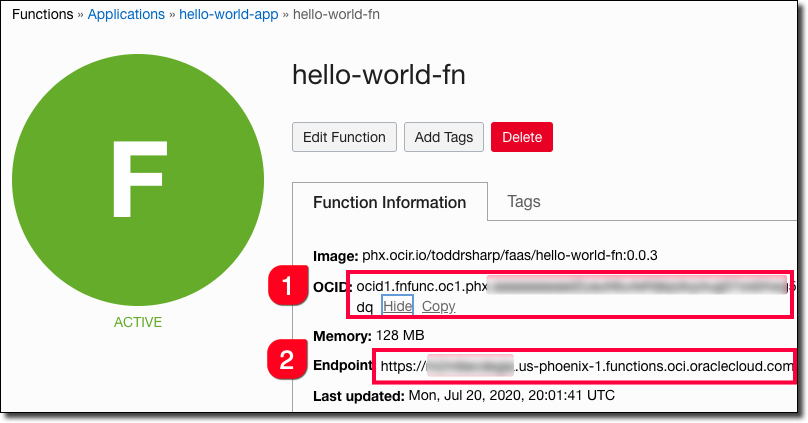
Within the OCI Console Dashboard, select your function application and then click on the function name to go into the function details view. On the function details view, the **[function-ocid] **is displayed (1), and the [invoke-endpoint] is shown but unlike the fn inspect in the previous example, only the [invoke-endpoint-base-url] is displayed.
Note: As of the time this blog post was originally published, the [invoke-endpoint] can be derived if only the [invoke-endpoint-base-url] is known and will always be in the following format:
[invoke-endpoint-base-url]/20181201/functions/[function-ocid]/actions/invoke
Via the OCI CLI
Finally, we can use the OCI CLI to gather the information like so:
$ oci fn function get --function-id [function-ocid]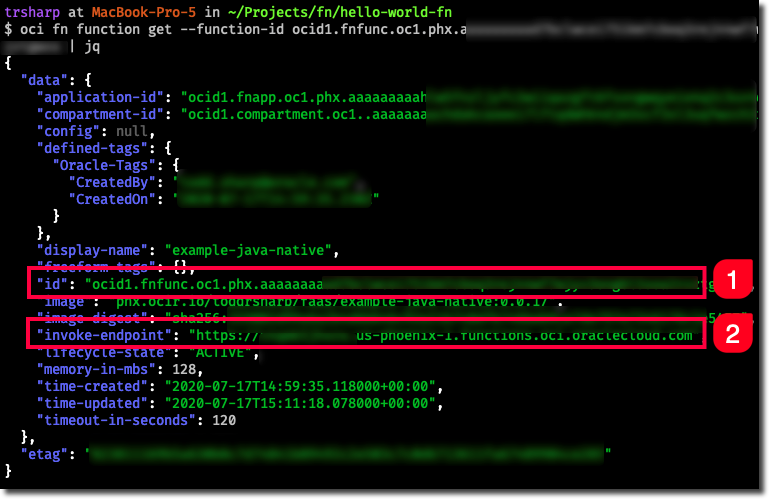
The [function-ocid] (1) and [invoke-endpoint-base-url] (2) are returned. The [invoke-endpoint] must be derived from this information.
Invoking Your Functions
Now that we’ve collected the necessary data, it’s invocation time.
Hey There! Since you’re reading about invoking serverless functions in the Oracle Cloud, you’re probably also interested in knowing everything there is to know about logging for your serverless Oracle Functions.
Invoking for Test/Debug Purposes
The first thing we’ll look at is invoking for test or debug purposes. In other words, you’re trying to just make a simple request and return a simple result from the command line to test your function out.
Invoking with the Fn CLI
You’re probably already familiar with this method, but we’ll quickly cover it for the sake of being comprehensive in this guide.
$ fn invoke [application-name] [function-name]If you need to pass data to the Fn invocation, use echo and pipe the data to the fn invoke call.
$ echo "{'name': 'todd'}" | fn invoke hello-world-app hello-world-fn
Invoking with the OCI CLI
You can also invoke your function via the OCI CLI. The file argument specifies a path to a file that will contain the function output ("-" will redirect to STDOUT) and the body argument lets us pass input to the function. Note that we need the [function-ocid] to use the OCI CLI instead of the [application-name] and [function-name] used by the Fn CLI above.
oci fn function invoke \ --file "-" \ --body '{"name": "todd"}' \ --function-id [function-ocid]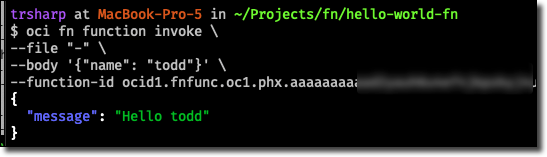
Invoking with oci-curl
You can also invoke via the command line using oci-curl.
**Disclaimer: **I don’t recommend this method. There’s really no need for it since it’s much easier to invoke via the Fn CLI or even the OCI CLI. However, I’ll begrudgingly include it here because technically it works and there may be times when you are unable to install either of the CLI tools but still have a need to invoke your functions to test them out. Use this method at your own discretion.
You’ll need a text file on disk that will contain the body that is sent in a POST request to your invoke endpoint. Even if you don’t need to pass input, you’ll still need an empty file on disk that represents the empty body. Don’t ask me, I didn’t write oci-curl. 😉
$ echo '{"name": "todd"}' > /tmp/body.jsonNow you can invoke the function like so:
oci-curl \
  "[invoke-endpoint-base-url]" \
  POST \
  /tmp/body.json \
  "/20181201/functions/[function-ocid]/actions/invoke"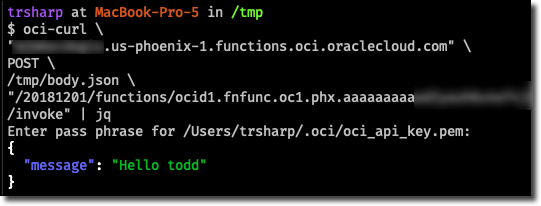
Invoking Automatically in Response to a Trigger or Event
Oracle Functions are deeply integrated into the Oracle Cloud Infrastructure family of services. There are a number of ways you can invoke a serverless function as the result of an event or in response to a given trigger.
Invoking via Oracle Notification Service
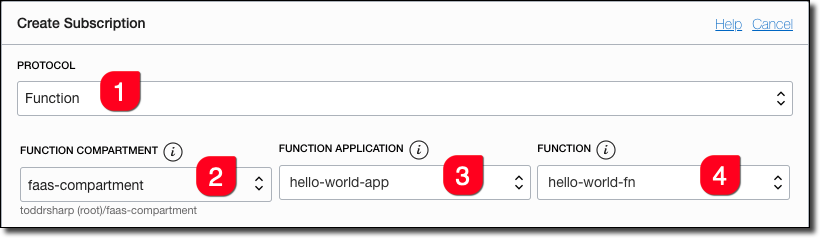
You can create a subscription to a notification topic which in turn invokes your Oracle Function.
**Tip! **Notifications are pretty awesome. Learn all about them with the complete developer’s guide to notifications service.
Create a new topic, or enter an existing topic and click ‘Create Subscription’. Choose ‘Functions’ as the protocol and search for and select the function you want to be invoked when the notification is received.
For more information, you can read an in-depth guide about notifications and functions integration.
Invoking via Cloud Events
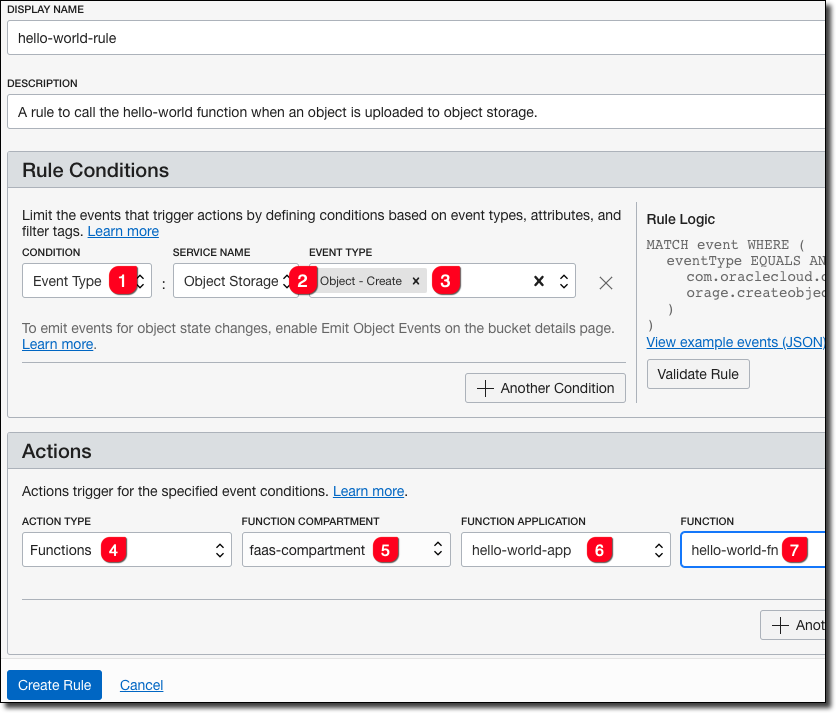
You can invoke your serverless function in response to a cloud event trigger. This integration is very powerful because of the large number of services that can produce cloud events in the Oracle Cloud as well as the ability to trigger cloud events based on metrics and alarms. When combined with the Oracle SDK of your preference, it can give you granular control over actions and resources in the cloud.
To call a function from a cloud event, create a rule like so:
For more information, see my post on triggering functions with cloud events.
Invoking via Oracle Integration Cloud
I do not have any experience with Oracle Integration Cloud, so I’m unable to provide further details on this method, but it is possible to call your serverless functions from Oracle Integration Cloud. If you need to know more about this, refer to the OIC documentation.
Invoking Manually via HTTP Request and SDKs
Finally, we come to one of the methods that developers will most likely utilize when implementing serverless functions as a part of their application infrastructure - manually invoking functions via HTTP or via an SDK.
Invoking with HTTP Requests (via API Gateway)
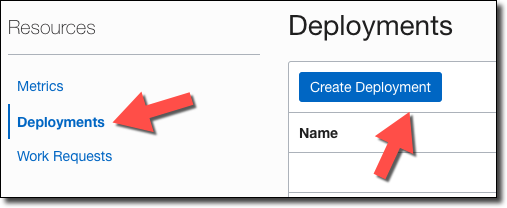
The OCI API Gateway service allows you to expose your serverless functions over HTTP (with optional Auth, CORS, and rate-limiting capabilities). To get started, create or select an existing gateway and then click ‘Create Deployment’.
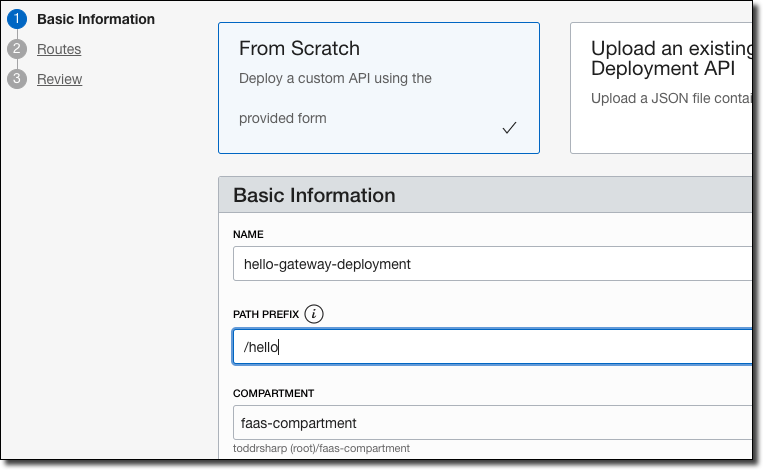
Choose ‘From Scratch’, enter a name, and a path prefix.
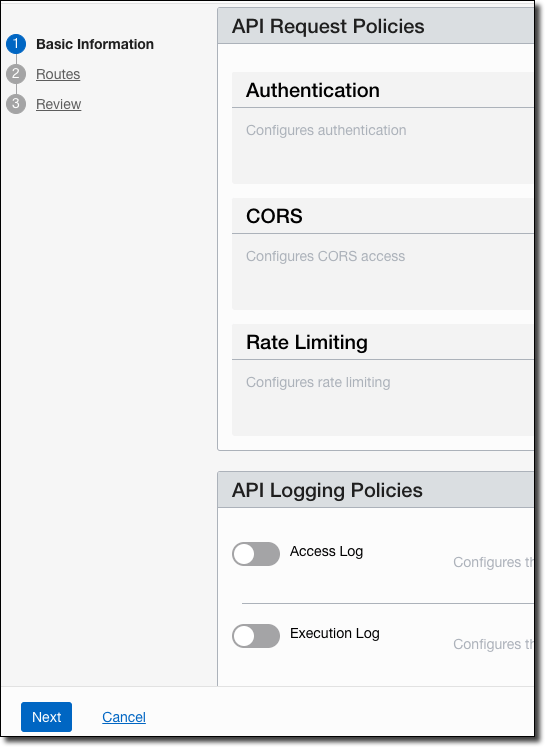
Configure Authentication, CORS, Rate Limiting, and Logging as necessary and then click ‘Next’.
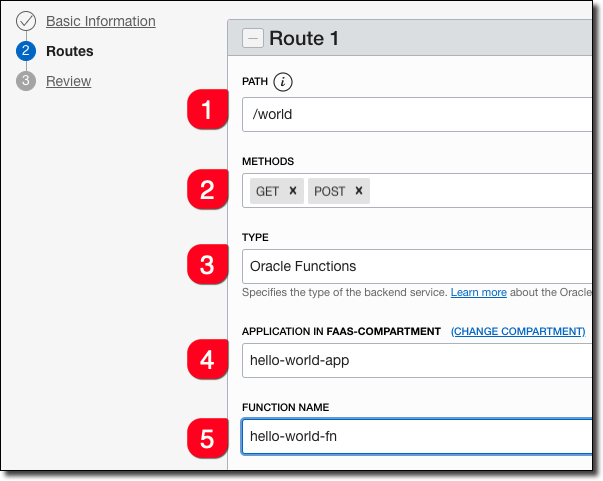
On the Routes tab, enter the (1) path (wildcards are accepted here), (2) HTTP methods, (3) choose Oracle Functions, (4) functions application and (5) function name.
On the next screen, review the information and then click ‘Create’. Once your changes have been deployed, view the deployment details to find the deployment’s invoke endpoint. This will be different from your function invoke endpoint.
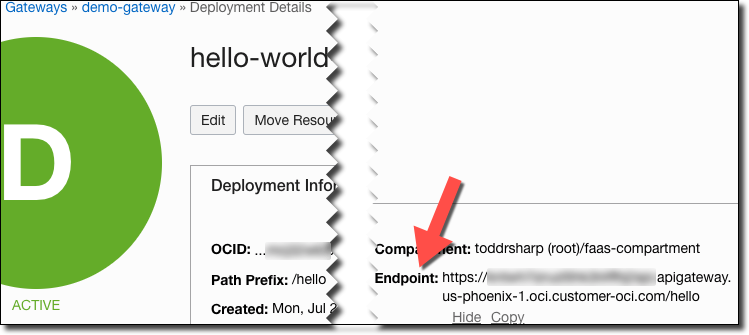
Use this invoke endpoint as the base URL, and append the route path you specified above to invoke your function via the gateway.

Invoking with the Java SDK
The OCI Java SDK includes two methods for invoking your serverless OCI Functions - one via a traditional, blocking client and another via an async client that relies on callbacks for non-blocking operations.
To get started with invoking your functions with the OCI Java SDK, first make sure that you have the following dependencies. I’m using Gradle, you’ll have to adjust for your chosen build system if it is different:
compile('javax.activation:javax.activation-api:1.2.0')
compile('com.oracle.oci.sdk:oci-java-sdk-common:1.19.3')
compile('com.oracle.oci.sdk:oci-java-sdk-functions:1.19.3')
Currently, there is an issue related to invoking functions with Java 11+, so to work around the issue we can force Java to use TLS 1.2 by setting the following system property in our script:
/* when using Java 11+, force TLS 1.2 */
System.setProperty("jdk.tls.client.protocols", "TLSv1.2");
Next, set the [function-ocid] and **[invoke-endpoint-base-url] **and create an instance of our auth provider.
String functionId = " [function-ocid]";
String invokeEndpoint = "[invoke-endpoint-base-url]";
ConfigFileAuthenticationDetailsProvider provider = new ConfigFileAuthenticationDetailsProvider("DEFAULT");
Now generate a payload that will be sent with the invoke request. Here we’re creating a Map that we’ll serialize into a JSON string and use that as the body to be sent with our invoke request.
/* generate the payload */
Map<String, String> payloadMap = new HashMap<>();
payloadMap.put("name", "Sync Client");
ObjectMapper mapper = new ObjectMapper();
String payload = mapper.writeValueAsString(payloadMap);
Next, we create an instance of the FunctionsInvokeClient, construct our invoke request, and pass the request to the client’s invokeFunction method. Then we can parse the response, close the client, and print the response to STDOUT.
/* use sync client */
FunctionsInvokeClient functionsInvokeClient = FunctionsInvokeClient.builder()
        .endpoint(invokeEndpoint)
        .build(provider);
InvokeFunctionRequest request = InvokeFunctionRequest.builder()
        .functionId(functionId)
        .invokeFunctionBody(
                StreamUtils.createByteArrayInputStream(payload.getBytes())
        )
        .build();
InvokeFunctionResponse invokeFunctionResponse = functionsInvokeClient.invokeFunction(request);
String syncResponse = IOUtils.toString(invokeFunctionResponse.getInputStream());
functionsInvokeClient.close();
System.out.println(syncResponse);
When we compile and run, we get the following output:
``
We can modify this approach to use the async client for non-blocking results. First, modify the payload:
/* use async client */
payloadMap.replace("name", "Async Client");
String asyncPayload = mapper.writeValueAsString(payloadMap);
Next, construct the async client and the invoke request.
FunctionsInvokeAsyncClient functionsInvokeAsyncClient = FunctionsInvokeAsyncClient.builder()
  .endpoint(invokeEndpoint)
  .build(provider);
InvokeFunctionRequest asyncRequest = InvokeFunctionRequest.builder()
  .functionId(functionId)
  .invokeFunctionBody(StreamUtils.createByteArrayInputStream(asyncPayload.getBytes()))
  .build();
Here’s where things get a little different than the previous approach. We’ll need an AsyncHandler to pass to the invokeFunction call that we can use to work with the results of the invocation.
AsyncHandler<InvokeFunctionRequest, InvokeFunctionResponse> handler = new AsyncHandler<>() {
    @Override
    public void onSuccess(InvokeFunctionRequest invokeFunctionRequest, InvokeFunctionResponse invokeFunctionResponse) {
        try {
            System.out.println(IOUtils.toString(invokeFunctionResponse.getInputStream()));
        } catch (IOException e) {
            e.printStackTrace();
        }
    }

    @Override
    public void onError(InvokeFunctionRequest invokeFunctionRequest, Throwable error) {
        error.printStackTrace();
    }
};
Finally, we pass the request and the handler to the invokeFunction method of the async client and then close the client.
functionsInvokeAsyncClient.invokeFunction(asyncRequest, handler);
functionsInvokeAsyncClient.close();
Running the async method produces the following content:
``
Invoking with the TypeScript/JavaScript SDK
The OCI TypeScript/JavaScript SDK also provides a way to invoke your serverless OCI Functions. To use this method, first install the SDK into your Node project.
npm install oci-sdk
Next, we’ll pull in the necessary modules and construct our authProvider
import fn = require("oci-functions");
import common = require("oci-common");
import helper = require("oci-common/lib/helper");
const configurationFilePath = "~/.oci/config";
const configProfile = "DEFAULT";
const authProvider: common.ConfigFileAuthenticationDetailsProvider =
      new common.ConfigFileAuthenticationDetailsProvider(
        configurationFilePath,
        configProfile
      );
Set our [function-ocid] and [invoke-endpoint-base-url].
const functionId: string = "[function-ocid]";
const invokeEndpoint: string = "[invoke-endpoint-base-url]";
Construct the client and set the endpoint:
const fnClient: fn.FunctionsInvokeClient = new fn.FunctionsInvokeClient({
  authenticationDetailsProvider: authProvider
});
fnClient.endpoint = invokeEndpoint;
Construct the request, pass it to the client and log the result:
(async () => {
  const request: fn.requests.InvokeFunctionRequest = {
    functionId: functionId,
    invokeFunctionBody: JSON.stringify({
      name: "Todd"
    })
  };
  const response: fn.responses.InvokeFunctionResponse = await fnClient.invokeFunction(request);
  console.log(
      JSON.parse(
        await helper.getStringFromResponseBody(response.value)
      )
  )
})()
Compile the TypeScript and invoke.

Invoking via Other SDKs and APIs
The OCI SDKs for .NET, Python, Ruby and Go also provide a way to invoke your serverless functions. Refer to the individual SDK documentation for further information.
You can also invoke your serverless functions directly via the OCI REST APIs, but this requires you to manually sign your HTTP request which can be tricky to manage. But, if you’re using a language or protocol that isn’t supported via any of the methods above, this is an option for you.
Photo by Goh Rhy Yan on Unsplash