Sending Email With OCI Email Delivery From Micronaut

Email delivery is a critical function of most web applications in the world today. I’ve managed an email server in the past - and trust me - it’s not fun or easy to do for a developer that isn’t as familiar with the infrastructure side of things. Thankfully, Oracle Cloud Infrastructure (OCI) offers an email delivery service that provides a managed solution for sending high-volume emails without setting up and managing an SMTP server. My favorite Java framework, Micronaut, recently released the Micronaut Email module that supports sending email in your applications. This release inspired me to see what it would take to use OCI email delivery in a Micronaut application. As usual, it’s pretty straightforward. So let’s see what it takes!
- Setup OCI Email Delivery
- Sending Email via OCI Email Delivery in Your Micronaut App
- Set Credentials Into the Application via Environment Variables
- Summary
Setup OCI Email Delivery
If you’ve not yet configured a user for email delivery, you’ll need to take care of that first. Normally, I’d walk you through that process, but in this case, I think the docs do an excellent job of keeping things concise, so I’ll link to them here instead. Here are the steps you’ll need to take:
We’ll need to collect our username, password, and SMTP endpoint before moving on to the next step.
Sending Email via OCI Email Delivery in Your Micronaut App
Now that we have the appropriate credentials and setup complete, we can move on to adding the Micronaut module to our application and configuring it to get ready to send emails.
Add Dependencies
We’ll need the following dependencies to enable our Micronaut application to send emails. If you don’t want to use templates, you could exclude the last two dependencies, but I’m going to include them since I’ll be showing how to use templates.
implementation("io.micronaut.email:micronaut-email-javamail")
implementation("io.micronaut.email:micronaut-email-template")
implementation("io.micronaut.views:micronaut-views-thymeleaf")
Tip! You can choose any of the template engines that are supported by Micronaut Views for email templates!
Configure Default Sender
We can specify a default sender for all emails by setting one into our configuration at /src/main/resources/application.yml:
micronaut:
  application:
    name: mnOciEmail
  email:
    from:
      email: default@email.com
      name: Email User
Note! The default email sender must be an “approved sender” in the OCI email delivery service!
Configure MailPropertiesProvider
Next, we will need to configure a MailPropertiesProvider. Creating the provider is accomplished via configuration settings in our application.yml file (located at /src/main/resources). The necessary configuration to generate the provider is below. Note that we’ll set the host value externally in just a bit.
javamail:
  properties:
    mail:
      smtp:
        port: 587
        auth: true
        starttls:
          enable: true
        host:
Configure SessionProvider
A SessionProvider is also necessary. For this, we’ll create a class that implements SessionProvider and within the session() method, we’ll create and return an instance of PasswordAuthentication. We will pass the username and password via the constructor. Again, we’ll set those values via external configuration in the next section of this blog post.
@Singleton
public class OciSessionProvider implements SessionProvider {
    private final Properties properties;
    private final String user;
    private final String password;

    public OciSessionProvider(
            MailPropertiesProvider properties,
            @Property(name = "codes.recursive.smtp.user") String user,
            @Property(name = "codes.recursive.smtp.password") String password
    ) {
        this.properties = properties.mailProperties();
        this.user = user;
        this.password = password;
    }

    @Override
    @NonNull
    public Session session() {
        return Session.getInstance(properties, new Authenticator() {
            @Override
            protected PasswordAuthentication getPasswordAuthentication() {
                return new PasswordAuthentication(user, password);
            }
        });
    }
}
Set Credentials Into the Application via Environment Variables
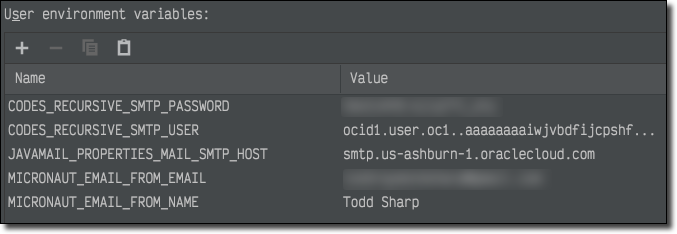
You could hardcode your credentials into your configuration files, but that would be a bad idea. It’s so bad that I don’t even do that for simple local demos anymore. We must insist on consistently enforcing security practices in our applications. So, if we’re not hardcoding them, how can we get them into the app? Well, one way is to set them into Java system properties. Another option is to set them into environment variables. Micronaut can translate a specifically constructed environment variable or system property into the proper configuration value. If you’re not familiar with this feature, I suggest that you read about it in the Application Configuration section of the docs. So, to pass in the credentials, I set the following environment variables in my IDE:
Send Email with EmailSender
At this point, we’re ready to inject the Micronaut EmailSender into our application and use it to send email messages. I’ve created a controller to test this out and inject the EmailSender like so:
@Controller("/email")
public class EmailController {

    private final EmailSender emailSender;

    public EmailController(EmailSender emailSender) {
        this.emailSender = emailSender;
    }

}
Send a Simple Plain Text Email
To send an email, use the Email builder:
@Get(uri="/", produces="text/plain")
public String index() {
    Email.Builder emailBuilder = Email.builder()
            .to("pipar27174@shackvine.com")
            .subject("Basic Micronaut Email Test: " + LocalDateTime.now())
            .body("This is an email");
    emailSender.send(emailBuilder);
    return "Email sent.";
}
To test this, hit the /email endpoint:
$ curl localhost:8080/email
Email sent.
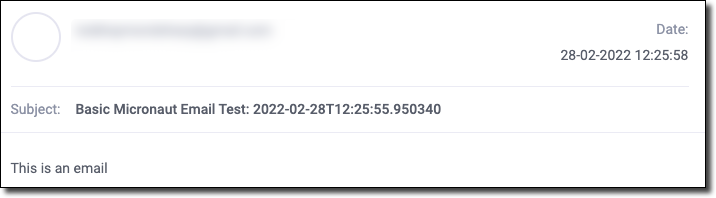
Checking the inbox where we sent the message will confirm the message delivery.
Send a Templated Email
To send an email using a Thymeleaf template, create a template at /src/main/resources/views/email.html and populate it like so:
<!DOCTYPE html>
<html lang="en" xmlns:th="http://www.thymeleaf.org">
<body>
    <p>
        Hello, <span th:text="${name}"></span>!
    </p>
</body>
Create an endpoint:
@Get(uri="/template/{name}", produces="text/plain")
public String template(@PathVariable String name) {
    Map model = CollectionUtils.mapOf("name", name);
    Email.Builder emailBuilder = Email.builder()
            .to("pipar27174@shackvine.com")
            .subject("Micronaut Email Template Test: " + LocalDateTime.now())
            .body(new TemplateBody<>(BodyType.HTML, new ModelAndView<>("email", model)));
    emailSender.send(emailBuilder);
    return "Email sent.";
}
Send an email by requesting the /email/template endpoint and pass the value for / like so:
$ curl localhost:8080/email/template/Todd%20Sharp
Email sent.
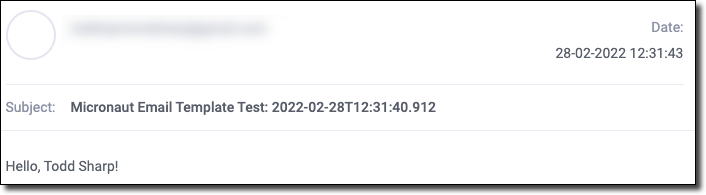
And check the inbox:
Send an Email With an Attachment
To send a message with an attachment, create a POST endpoint located at /email/attachment that consumes a multipart form.
@Post(uri="/attachment", produces="text/plain", consumes = MediaType.MULTIPART_FORM_DATA)
public String attachment(CompletedFileUpload file) throws IOException {
    Email.Builder emailBuilder = Email.builder()
            .to("pipar27174@shackvine.com")
            .subject("Micronaut Email Attachment Test: " + LocalDateTime.now())
            .body("This is an email")
            .attachment(
                    Attachment.builder()
                            .filename(file.getFilename())
                            .contentType(file.getContentType().isPresent() ? file.getContentType().get().toString() : MediaType.APPLICATION_OCTET_STREAM)
                            .content(file.getBytes())
                            .build()
            );
    emailSender.send(emailBuilder);
    return "Email sent.";
}
And POST a request to the /email/attachment endpoint that includes a file:
$ curl -X POST \
  -H "Content-Type: multipart/form-data" \
  -F "file=@/Users/trsharp/Pictures/demo/apple.jpg" \
  localhost:8080/email/attachment
Email sent.
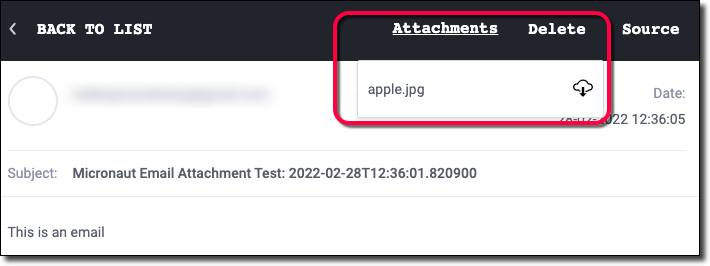
Check the inbox:
Summary
This post looked at how to use OCI email delivery in a Micronaut application to send text-based and templated email messages. We also learned how to send emails with attachments with the EmailSender. As always, you can refer to the project on GitHub for the full source code used in this demo.