Oracle Cloud Detection And Metadata With Micronaut

As the popularity of microservices grows, so does the availability of solid frameworks in the JVM world for creating microservice applications. Helidon is Oracle’s offering with both a lightweight, reactive style version (SE) and a full-fledged MicroProfile compliant version (MP). Helidon offers a few nice cloud integrations with Oracle Cloud such as a CDI extension for injecting an OCI Object Storage client into your application and additional cloud support planned in the future.
Micronaut is another popular framework for microservices. Their slogan “natively cloud native” implies that the framework was built from the ground up to support cloud native applications of any shape or size with a large number of features and extensions that enable integration with a number of cloud providers and external services such as Kafka. I’ve become fond of using Micronaut due to the fact that it makes it very easy to use my favorite language (Groovy) which means that I can use things like GORM for data persistence really easily.
One of the features that Micronaut offers is the ability to detect the application’s current cloud environment, provide configuration specific for said environment, and extract metadata about that environment from within the running application. Most of the large cloud providers are supported, so when I noticed that Oracle Cloud wasn’t on the original list I decided to add that functionality via a pull request. I’m happy to announce that the PR was accepted and merged, so as of version 1.2.0.RC1 the framework now supports Oracle Cloud with this feature.
Let’s take a quick look at how we can detect that our Micronaut application is running on Oracle Cloud, and how we can retrieve the metadata associated with the VM instance that the app is running on. The first step is to create a simple Micronaut application. That’s done by using the Micronaut CLI with the following command:
$ mn create-app metadata-demo
As of the time of this blog post, the CLI might give you an older version of the Micronaut framework dependency. Inspect your generated build.gradle file, and update it as necessary to make sure you’re app uses 1.2.0.RC1:
dependencyManagement {
    imports {
        mavenBom 'io.micronaut:micronaut-bom:1.2.0.RC1'
    }
}
Then, create a controller:
$ mn create-controller Metadata
Out of the box, our controller looks like this:
package metadata.demo;

import io.micronaut.http.annotation.Controller;
import io.micronaut.http.annotation.Get;
import io.micronaut.http.HttpStatus;

@Controller("/metadata")
public class MetadataController {

    @Get("/")
    public HttpStatus index() {
        return HttpStatus.OK;
    }
}
Next, let’s create a configuration file that is exclusive to the Oracle Cloud environment. Under /src/main/resources you should notice a file called application.yml. Copy it, and rename it as application-oraclecloud.yml. Modify it to look like so:
micronaut:
  application:
    name: metadata
test: 'i am running on OCI!'
Now modify application.yml to add a default value for the test property:
micronaut:
  application:
    name: metadata-demo
test: 'default value'
We’ll have to inject this property into our controller and set it into an instance variable for later use, so modify the controller so that it looks like this:
@Controller("/metadata")
public class MetadataController {

    String testConfigValue = null;

    @Inject
    MetadataController( @Property(name="test") String test ){
        this.testConfigValue = test;
    }

    @Get("/")
    public HttpStatus index() {
        return HttpStatus.OK;
    }
}
Next, we’ll need to know when the service is started so that we can grab and store a copy of the service instance. Register an event listener in the controller to listen for the ServiceStartedEvent, grab the ServiceInstance and save it. While we’re here, add in @Inject for the ApplicationContext too, we’ll use that later. Your controller should look like this at this point:
@Controller("/metadata")
public class MetadataController {

    final static Logger logger = LoggerFactory.getLogger(MetadataController.class);
    private ServiceInstance serviceInstance;
    @Inject ApplicationContext applicationContext;
    String testConfigValue = null;

    @Inject
    MetadataController( @Property(name="test") String test ){
        this.testConfigValue = test;
    }

    @EventListener
    void onServiceStarted(ServiceStartedEvent event) {
        ServiceInstance serviceInstance = event.getSource();
        this.serviceInstance = serviceInstance;
    }

    @Get("/")
    public HttpStatus index() {
        return HttpStatus.OK;
    }
}
Now let’s modify the index() method to return our config value:
@Get("/")
@Produces(MediaType.APPLICATION_JSON)
public HttpResponse<Object> index() {
    Map<String, Object> meta = new HashMap<>();
    meta.put("configValue", this.testConfigValue);
    return HttpResponse.ok(meta);
}
And launch the application locally with gradle run which will result in the following once we navigate to http://localhost:8080/metadata:
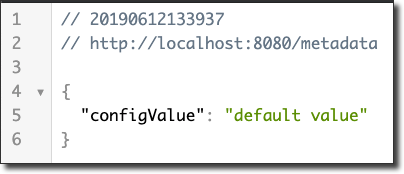
We can see that our config value from application.yml was picked up and returned. Since we’re running outside of the Oracle Cloud environment, the default configuration file value was used. Before we deploy the application, let’s modify the controller method to also include the metadata values.
@Get("/")
@Produces(MediaType.APPLICATION_JSON)
public HttpResponse<Object> index() {
    Map<String, Object> meta = new HashMap<>();
    meta.put("configValue", this.testConfigValue);
    meta.put("applicationEnvironment", applicationContext.getEnvironment().getActiveNames());
    meta.put("id", serviceInstance.getId());
    meta.put("region", serviceInstance.getRegion());
    meta.put("instanceId", serviceInstance.getInstanceId());
    meta.put("host", serviceInstance.getHost());
    meta.put("metadata", serviceInstance.getMetadata());
    return HttpResponse.ok(meta);
}
If we ran this locally, we wouldn’t see much since there isn’t any metadata available for our loclhost. But if we package it with gradle assemble, deploy it to a VM on OCI and test it out we’ll see much more information.

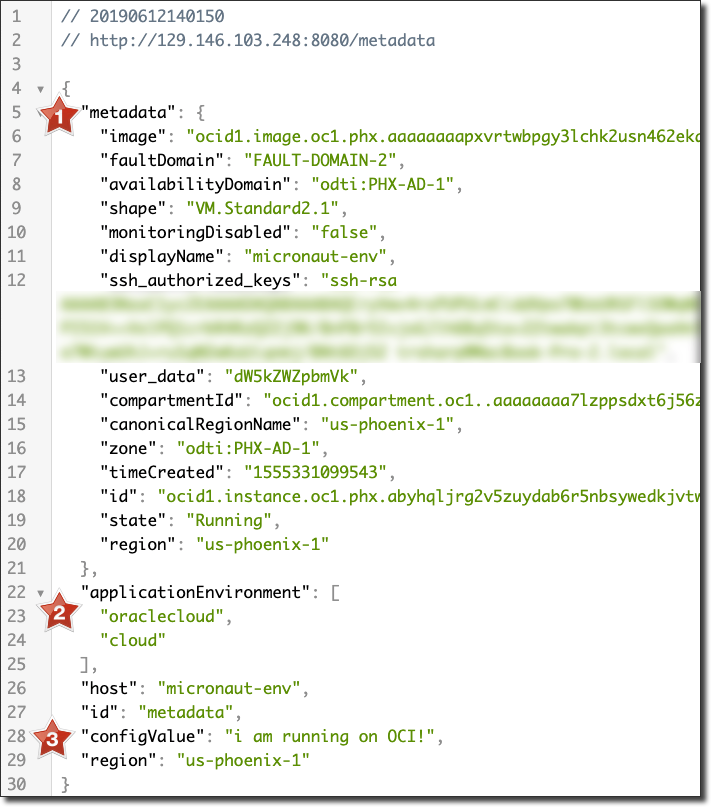
Note a few items:
- The instance metadata, including the image OCID, domain info, compartment ID, instance ID, etc.
- The current running environment
- The config value loaded from
application-oraclecloud.yml
You can imagine that l[oading specific configuration related to the current deployed environment] would be pretty useful in your microservice application. Of course there are a number of additional features available in Micronaut for Cloud Native applications, so check out the docs for more info on those.
Image by cocoparisienne from Pixabay