MongoDB via Morphia in Spark Java

The latest journey in my quest to see just how many new technologies and frameworks I can learn in one week involves Morphia. Morphia is a “Java Object Document Mapper for MongoDB”. In other words, it let’s us map our POJOs and POGOs to MongoDB Documents and persist them in MongoDB. \
Right, so, on to the codes. To get started with Morphia declare a dependency as such:
compile group: 'org.mongodb.morphia', name: 'morphia', version: '1.3.1'
Obviously you’ll need to make sure you’ve got access to a running instance of MongoDB before you try to connect/persist to it. Next, create a domain class - we’ll call this one Person:
package codes.recursive.domain

import groovy.transform.ToString
import org.bson.types.ObjectId
import org.mongodb.morphia.annotations.Entity
import org.mongodb.morphia.annotations.Id

@Entity("person")
@ToString(includeNames = true)
class Person {
    @Id
    ObjectId id
    String firstName
    String lastName
}
We’ve annotated this domain class with @Entity and the ID with @Id as required by the framework. To make things a bit more realistic, I’ve wrapped some common functionality for dealing with a Person in a PersonService. The service will handle getting a reference to the framework and the datastore (I’d probably include that in an abstract service in a real application) and has a save(), list() and findById() method. Standard stuff:
package codes.recursive.service

import codes.recursive.domain.Person
import com.mongodb.MongoClient
import org.bson.types.ObjectId
import org.mongodb.morphia.Datastore
import org.mongodb.morphia.Morphia

class PersonService {
    Morphia _morphia
    Datastore _datastore

    def getMorphia() {
        if( !_morphia ) {
            _morphia = new Morphia()
            _morphia.mapPackage("codes.recursive.domain");
        }
        return _morphia
    }

    def getDatastore() {
        if( !_datastore ) {
            _datastore = morphia.createDatastore(new MongoClient("localhost", 27017), "mongodb");
            _datastore.ensureIndexes()
        }
        return _datastore
    }

    def save(Person person) {
        datastore.save( person )
    }

    def list() {
        def q = datastore.createQuery(Person.class)
        return q.asList()
    }

    def findById(String id){
        def q = datastore.createQuery(Person.class)
        return q.filter("id", new ObjectId(id)).asList()?.first()
    }
}
Next we’ll create a simple route in Spark Java to interact with our PersonService, create and persist a new Person if necessary and return a list of Persons to our view.
get "/mophia", { req, res ->
    def model = [:]
    def person = personService.findById('58e46f2a5b21434c8b592665')
    if (!person) {
        person = new Person(firstName: 'Foo', lastName: 'Manchu')
        personService.save(person)
    }

    model << [people: personService.list()]
    return engine.render(new ModelAndView(commondModel() << model, "morphia"))
}
And finally, the view code if you’re dying to see that:
<!DOCTYPE html SYSTEM "http://www.thymeleaf.org/dtd/xhtml1-strict-thymeleaf-4.dtd">
<html xmlns:layout="http://www.ultraq.net.nz/thymeleaf/layout"
      layout:decorate="~{fragments/main}" th:with="nav=${menu}">

<head>
    <title>Thymeleaf Layout Page</title>
</head>

<body>

    <div layout:fragment="content">
        <table class="table table-bordered">
            <tr>
                <th>ID</th>
                <th>First</th>
                <th>Last</th>
            </tr>
            <tr th:each="person : ${people}">
                <td th:text="${person.id}"></td>
                <td th:text="${person.firstName}"></td>
                <td th:text="${person.lastName}"></td>
            </tr>
        </table>
    </div>

</body>
</html>
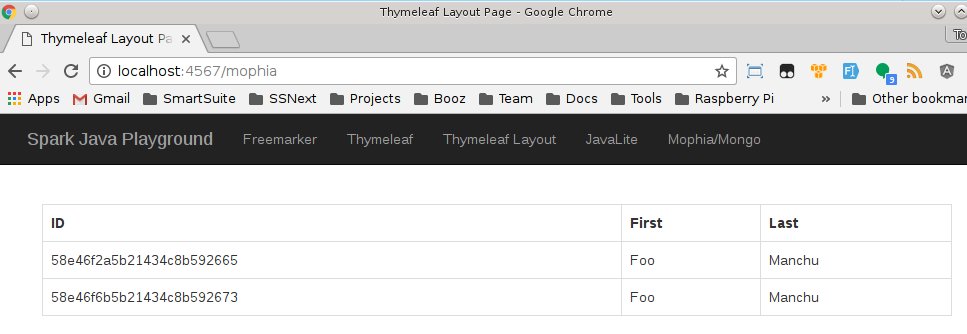
Which results in the following:
And that’s simple object based persistence in MongoDB via a Spark Java application. \