Spark Java Views Using Thymeleaf

The next step in using Spark Java with Groovy that I would like to look at is getting data into a view. With Grails, we’re used to using GSP pages - and they work great, but Spark Java doesn’t have view support out of the box. Instead, it let’s you choose a template engine. The alternative is to simply serve static HTML pages and retrieve any data via Ajax calls. That’s a valid strategy in some cases, but most sites will require some level of dynamic data in the view and requiring Ajax for all of that data isn’t always the best solution. Enter Thymeleaf. In their words:
Thymeleaf is a modern server-side Java template engine for both web and standalone environments, capable of processing HTML, XML, JavaScript, CSS and even plain text.
The main goal of Thymeleaf is to provide an elegant and highly-maintainable way of creating templates. To achieve this, it builds on the concept of Natural Templates to inject its logic into template files in a way that doesn’t affect the template from being used as a design prototype. This improves communication of design and bridges the gap between design and development teams.
Thymeleaf has also been designed from the beginning with Web Standards in mind – especially HTML5 – allowing you to create fully validating templates if that is a need for you.
At it’s simplest, Thymeleaf will allow us to pass a model into our view and render a value in the view via a simple syntax. Here’s a modified Bootstrap class from the one we created in the last blog post:
import spark.ModelAndView
import spark.template.thymeleaf.ThymeleafTemplateEngine

import static spark.Spark.get

class Bootstrap {
    static void main(String[] args) {
        ThymeleafTemplateEngine engine = new ThymeleafTemplateEngine();

        get "/hello", { req, res -> "Hello World" }
        get "/goodbye", { req, res -> "Goodbye World" }
        get "/thymeleaf", { req, res ->
            def list = []
            10.times {
                list << [id: it, firstName: "Name $it"]
            }
            def model = [name: 'Todd', list: list]
            return engine.render(new ModelAndView(model, "thymeleaf"))
        }
    }
}
We declare our engine on line 8, and in our “/thymeleaf” route we use the engine to return our rendered view, passing the model as the first argument and the view name (sans the extension) as the second argument.
Let’s create that view now. Create a directory (if none exists) at src/main/groovy/resources/templates and create a file called thymeleaf.html. Here’s what that view looks like:
<!DOCTYPE html SYSTEM "http://www.thymeleaf.org/dtd/xhtml1-strict-thymeleaf-4.dtd">
<html xmlns="http://www.w3.org/1999/xhtml" xmlns:th="http://www.thymeleaf.org">
<head>
    <meta charset="UTF-8" />
    <title>Title</title>
</head>
<body>
<p>Hello, <span th:text="${name}"></span></p>
<ul>
    <li th:each="i, status : ${list}">
        Index: <span th:text="${status.index}"></span>
        ID: <span th:text="${i.id}">id</span>
    </li>
</ul>
</body>
</html>
We shouldn’t forget to add our dependency for Thymeleaf in our build.gradle script:\
compile group: 'com.sparkjava', name: 'spark-template-thymeleaf', version: '2.5.5'
Now run the app like before with gradle runServer. Hit the view in your browser and you’ll see:
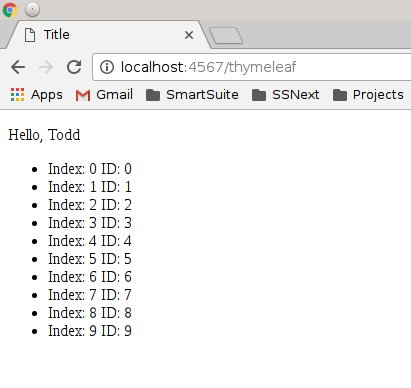
We’ve just scratched the surface of what Thymeleaf can do. This tutorial has many more examples of the various features, but the syntax has a “GSP like” feel to it which I like. I should note that Spark Java supports many different template engines so you’re not locked into using Thymeleaf. Feel free to use any that you’re comfortable with.