Migrate Your Kafka Workloads To Oracle Cloud Streaming

Migrating your applications and workloads from one hosting environment to another can be a very painful process. I’ve had to manage migrations many times over the last 15 years, and it’s never completely easy or all that much fun. There is inevitably some issue that comes up that wasn’t anticipated and sometimes even a simple upgrade can cause endless headaches. So I sympathize with any Developer or DevOps Engineer who might have to migrate their application to the Oracle Cloud. At the same time, I think the benefits of moving your applications to the Oracle Cloud outweigh the downside in just about every case. There is a lot of thought given to the pain of migration internally, so we’ve created a number of tools and small “wins” to make the process easier and less painful. I want to talk about one of those “wins” today in this post.
Kafka is undoubtedly popular for data streaming (and more) because it works well, is reliable and there are a number of SDK implementations that make working with it very easy. Your application might already work with Kafka - perhaps you are producing messages from one microservice and consuming them in another. So why should you consider Oracle Streaming Service (OSS) instead of Kafka for this purpose? In my experience, setting up and maintaining the infrastructure to host Zookeeper and your own Kafka cluster requires a lot of work (and cost) and means you need some in depth knowledge and have to spend some extra time managing the entire setup. Using a service like OSS instead gives you back that time (and some of the cost) by providing a hosted option that works “out-of-the-box”. In this post I’ll show you that you can easily use OSS in your application using the Kafka SDK for Java.
Setting Up A Stream
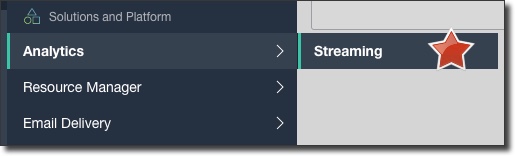
First things first, let’s quickly set up a Stream topic for this demo. From the Oracle Cloud dashboard console, select ‘Analytics’ -> ‘Streaming’.
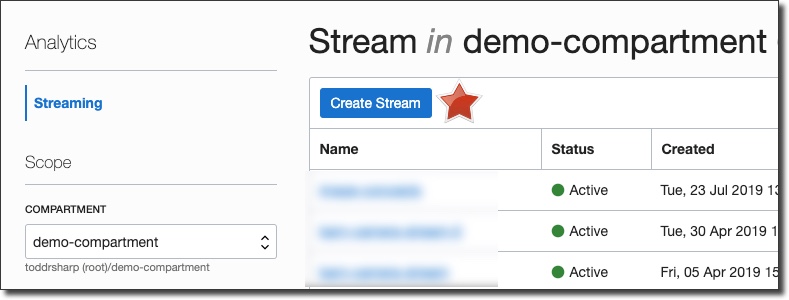
On the Stream List page, click ‘Create Stream’ (choose the proper compartment to contain this stream in the left sidebar if necessary):
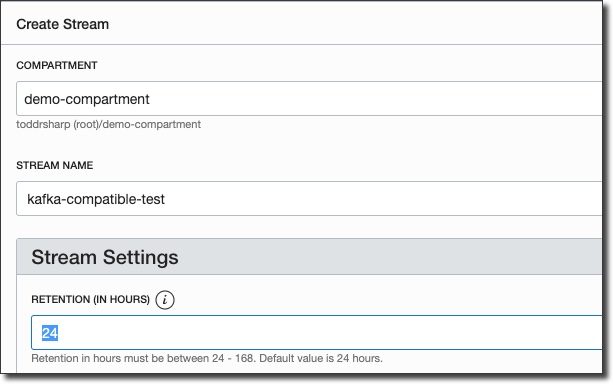
In the ‘Create Stream’ dialog, name the stream and enter a value for Retention (how long a message is kept on a topic before it is discarded):
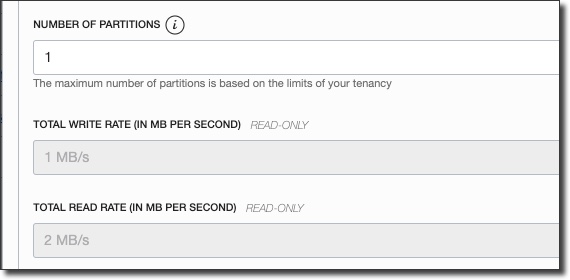
Enter the desired number of partitions and then click ‘Create Stream’.
You’ll be taken directly to the details view for the new stream, and in about 30 seconds your stream will be shown in ‘Active’ state.
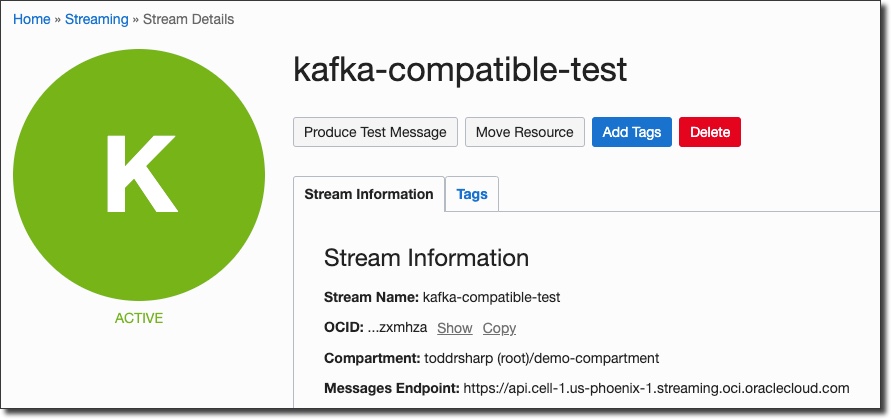
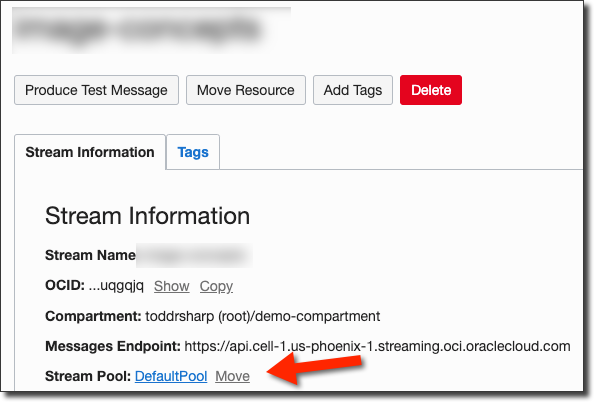
Now we’ll need to grab the stream pool ID that our stream has been placed into. If you haven’t specified a pool, your stream will be placed in a “Default Pool”. Click on the pool name on the stream details page:
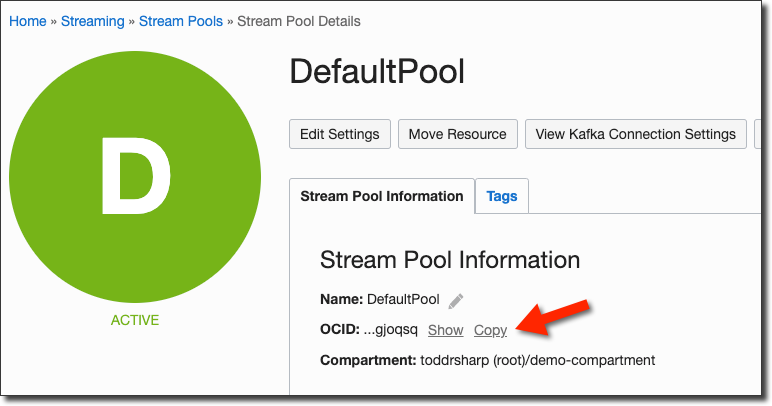
On the stream pool details page, copy the stream pool OCID and keep it handy for later:
Create A Streams User
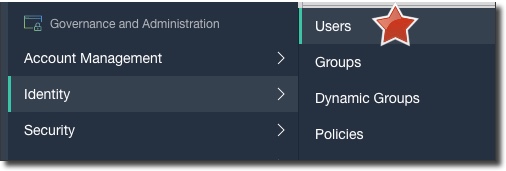
Next up, let’s create a dedicated user for the streaming service. Click on ‘Users’ under ‘Identity’ in the console sidebar menu:
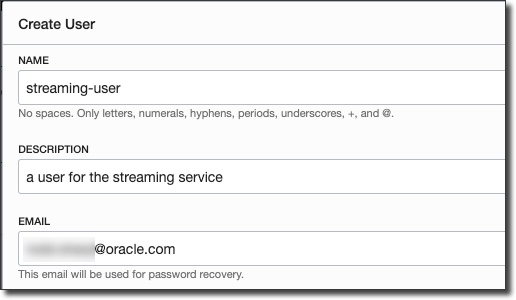
Click ‘Create User’ and populate the dialog:
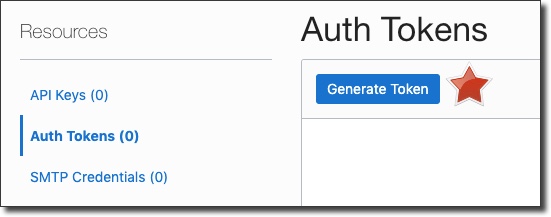
After the new user is created, go to the user details page and generate an auth token:
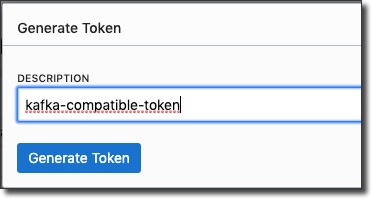
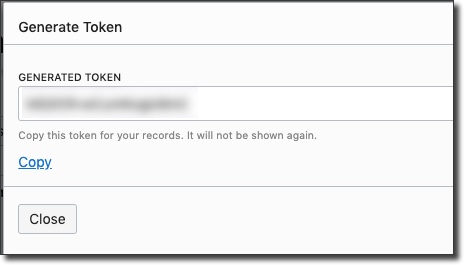
Copy the token and keep it handy - you can not retrieve it after you leave the ‘Generate Token’ dialog. Now, we’ll need to create a group, add the new user to that group, and create a group policy:
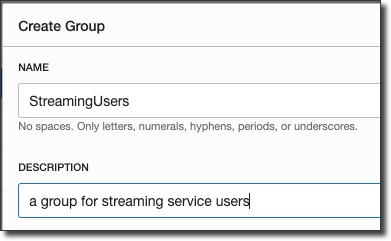
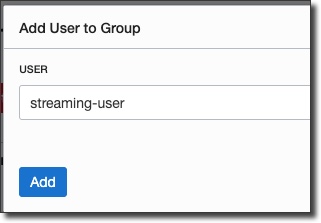
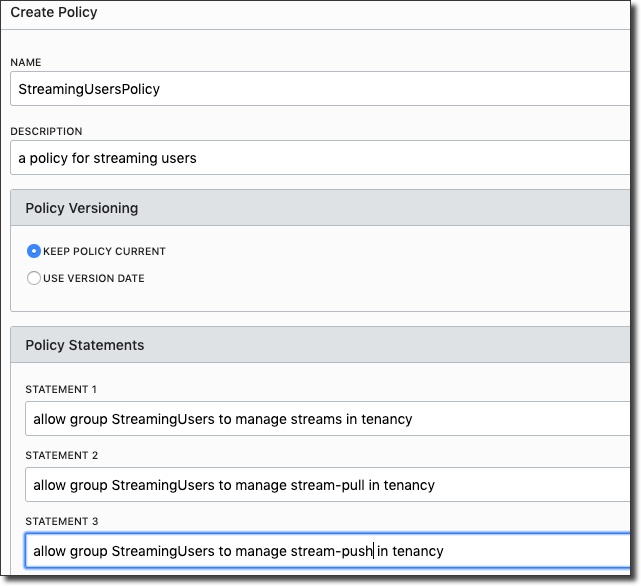
Great, now we have a user with an auth token, in a group that can work with streams. We also have our stream pool OCID, so we’re ready to dig into some code.
Create A Kafka Producer
So we’re ready to move forward with some code that works with this stream by using the Kafka Client SDK. So the first step in our project is to make sure that we have the dependency declared for the Client SDK. I’m using Gradle, if you’re using something else modify as appropriate:
plugins {
    id 'java'
    id 'application'
}

group 'codes.recursive'
version '0.1-SNAPSHOT'

sourceCompatibility = 1.8

repositories {
    mavenCentral()
}

application {
    mainClassName = 'codes.recursive.KafkaProducerExample'
}


dependencies {
    compile group: 'org.apache.kafka', name: 'kafka-clients', version: '2.3.0'
    testCompile group: 'junit', name: 'junit', version: '4.12'
}

tasks.withType(JavaExec) {
    systemProperties System.properties
}
I’m using a small Java program to test the producer and my main class looks like so:
package codes.recursive;

public class KafkaProducerExample {

    public static void main(String... args) throws Exception {
        System.out.println("producer");
        CompatibleProducer producer = new CompatibleProducer();
        producer.produce();
    }

}
Before we build the CompatibleProducer class, create a Run/Debug configuration in your IDE to pass in the necessary credentials that we collected earlier:
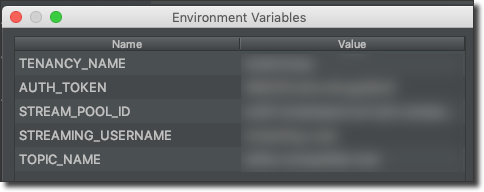
It’s not terribly complicated, but let’s build the CompatibleProducer class up one piece at a time so it’s easy to understand each piece. First, declare some variables for our credentials and set them from the environment variables we are passing in to the application:
public class CompatibleProducer {

    public void produce() {
        String authToken = System.getenv("AUTH_TOKEN");
        String tenancyName = System.getenv("TENANCY_NAME");
        String username = System.getenv("STREAMING_USERNAME");
        String streamPoolId = System.getenv("STREAM_POOL_ID");
        String topicName = System.getenv("TOPIC_NAME");
     }
}
Next, create some properties that we will use to construct our KafkaProducer. These are the necessary properties that you’ll need to set to access your OSS stream with the Kafka SDK.
Note: You may need to change the region value in “bootstrap.servers” to the region in which your streaming topic was created.
Properties properties = new Properties();
properties.put("bootstrap.servers", "streaming.us-phoenix-1.oci.oraclecloud.com:9092");
properties.put("security.protocol", "SASL_SSL");
properties.put("sasl.mechanism", "PLAIN");
properties.put(ProducerConfig.KEY_SERIALIZER_CLASS_CONFIG, StringSerializer.class.getName());
properties.put(ProducerConfig.VALUE_SERIALIZER_CLASS_CONFIG, StringSerializer.class.getName());

properties.put("sasl.jaas.config",
                "org.apache.kafka.common.security.plain.PlainLoginModule required username=""
                + tenancyName + "/"
                + username + "/"
                + streamPoolId + "" "
                + "password=""
                + authToken + "";"
);

properties.put("retries", 5); // retries on transient errors and load balancing disconnection
properties.put("max.request.size", 1024 * 1024); // limit request size to 1MB
Finally, construct a KafkaProducer and send in the properties and produce 5 “test” messages to the topic:
KafkaProducer producer = new KafkaProducer<>(properties);

for (int i = 0; i < 5; i++) {
    ProducerRecord<String, String> record = new ProducerRecord<>(topicName, UUID.randomUUID().toString(), "Test record #" + i);
    producer.send(record, (md, ex) -> {
        if( ex != null ) {
            ex.printStackTrace();
        }
        else {
            System.out.println(
                    "Sent msg to "
                            + md.partition()
                            + " with offset "
                            + md.offset()
                            + " at "
                            + md.timestamp()
            );
        }
    });
}
producer.flush();
producer.close();
System.out.println("produced 5 messages");
Run the program in your IDE and you should see output similar to this:
> Task :producer:run
producer
SLF4J: Failed to load class "org.slf4j.impl.StaticLoggerBinder".
SLF4J: Defaulting to no-operation (NOP) logger implementation
SLF4J: See http://www.slf4j.org/codes.html#StaticLoggerBinder for further details.
Sent msg to 0 with offset 57 at 1570626362254
Sent msg to 0 with offset 58 at 1570626362254
Sent msg to 0 with offset 59 at 1570626362254
Sent msg to 0 with offset 60 at 1570626362254
Sent msg to 0 with offset 61 at 1570626362254
produced 5 messages

BUILD SUCCESSFUL in 8s
2 actionable tasks: 2 executed
09:06:01: Task execution finished 'run'.
Disconnected from the target VM, address: '127.0.0.1:59701', transport: 'socket'
Now quickly check the streaming console and confirm that the 5 messages were produced and can be read:
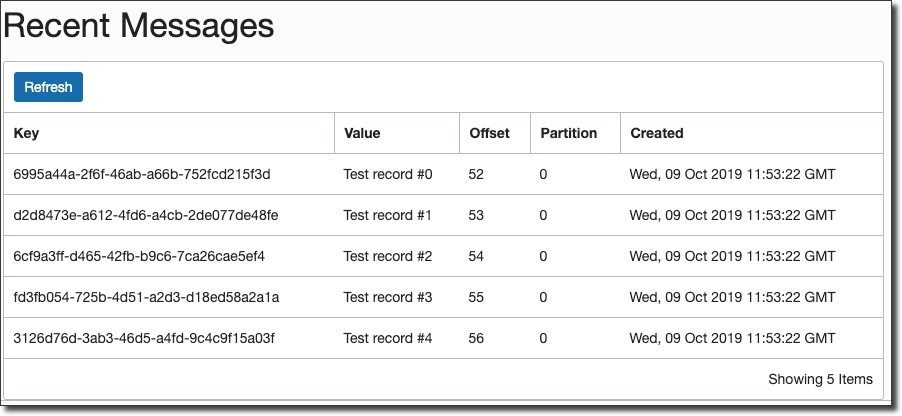
Next, we’ll create a Kafka compatible consumer to consume the messages that we produce.
Create A Kafka Consumer
Many of the steps in creating a consumer are quite similar to the steps required to create a producer (Gradle dependencies, environment variables for Run config, etc), so I’ll focus here on the CompatibleConsumer class itself. Don’t fret, you can view the entire code for this blog post on GitHub if you feel like something is missing. Let’s create our compatible consumer!
The consumer starts out similarly - declaring the credentials, setting some properties (which do differ slightly from the producer, so beware!) and creating the Consumer itself:
Note: As with the producer, you may need to change the region value in “bootstrap.servers” to the region in which your streaming topic was created.
String authToken = System.getenv("AUTH_TOKEN");
String tenancyName = System.getenv("TENANCY_NAME");
String username = System.getenv("STREAMING_USERNAME");
String streamPoolId = System.getenv("STREAM_POOL_ID");
String topicName = System.getenv("TOPIC_NAME");

Properties properties = new Properties();
properties.put("bootstrap.servers", "streaming.us-phoenix-1.oci.oraclecloud.com:9092");
properties.put("security.protocol", "SASL_SSL");
properties.put("sasl.mechanism", "PLAIN");
properties.put(ConsumerConfig.GROUP_ID_CONFIG, "group-0");
properties.put(ConsumerConfig.KEY_DESERIALIZER_CLASS_CONFIG, StringDeserializer.class.getName());
properties.put(ConsumerConfig.VALUE_DESERIALIZER_CLASS_CONFIG, StringDeserializer.class.getName());

properties.put("sasl.jaas.config",
        "org.apache.kafka.common.security.plain.PlainLoginModule required username=""
                + tenancyName + "/"
                + username + "/"
                + streamPoolId + "" "
                + "password=""
                + authToken + "";"
);
properties.put("max.partition.fetch.bytes", 1024 * 1024); // limit request size to 1MB per partition

Consumer<Long, String> consumer = new KafkaConsumer<>(properties);
At this point, we create a subscription to the topic we created and poll every 1 second for new messages:
try {
    consumer.subscribe(Collections.singletonList( topicName ) );

    while(true) {
        Duration duration = Duration.ofMillis(1000);
        ConsumerRecords<Long, String> consumerRecords = consumer.poll(duration);
        consumerRecords.forEach(record -> {
            System.out.println("Record Key " + record.key());
            System.out.println("Record value " + record.value());
            System.out.println("Record partition " + record.partition());
            System.out.println("Record offset " + record.offset());
        });
        // commits the offset of record to broker.
        consumer.commitAsync();
    }
}
catch(WakeupException e) {
    // do nothing, shutting down...
}
finally {
    System.out.println("closing consumer");
    consumer.close();
}
The final step is to run our consumer example and then fire up our producer to watch the consumer consume the newly produced messages:
> Task :consumer:run
consumer
org.apache.kafka.common.security.plain.PlainLoginModule required username="tenancy/username/[stream pool id]" password="[auth token]";
SLF4J: Failed to load class "org.slf4j.impl.StaticLoggerBinder".
SLF4J: Defaulting to no-operation (NOP) logger implementation
SLF4J: See http://www.slf4j.org/codes.html#StaticLoggerBinder for further details.
Record Key 92a078df-89bd-4c55-a40b-668509f5d543
Record value Test record #0
Record partition 0
Record offset 62
Record Key ba12e804-49b0-49cc-ac6f-c45dc52bf543
Record value Test record #1
Record partition 0
Record offset 63
Record Key 29883f60-5fb1-4c94-a23f-5a489f109d82
Record value Test record #2
Record partition 0
Record offset 64
Record Key 00af0e12-a92f-4162-b2a6-22cdcf04fd73
Record value Test record #3
Record partition 0
Record offset 65
Record Key dd69776a-1bfd-419a-b6b0-7445c098b20e
Record value Test record #4
Record partition 0
Record offset 66
<=========----> 75% EXECUTING [35s]
And with that, you’ve successfully produced and consumed messages to/from an Oracle Streaming Service topic using the Kafka SDK for Java.
Hey! All of the code for this blog post is available on GitHub: https://github.com/recursivecodes/oss-kafka-compatible-streaming
Photo by Hendrik Cornelissen on Unsplash