Microservices The Easy Way With ORDS And Micronaut - Part 2

In our last post, we exposed our user table with a complete set of REST endpoints that can be used for CRUD operations. The good news is, from this point on, we’re done writing SQL for this microservice. From here on out we’ll use Micronaut with Java to interface with the endpoints and provide validation for our persistence operations.
If you haven’t yet worked with Micronaut, the first thing you’ll want to do is install the Micronaut CLI which we can use to scaffold our our application and some additional classes as needed. Simple instructions for installing the CLI, taken from the Micronaut site are as follows:
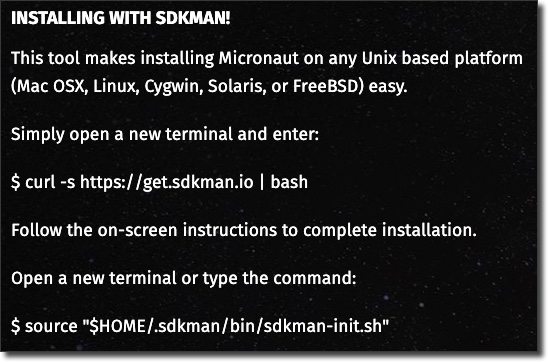
We’ll deviate from their instructions at this point and install a specific version of the CLI:
sdk install micronaut 1.2.0.RC2
Confirm the install with:
mn --version| Micronaut Version: 1.2.0.RC2
Create The Application
Now we can create our application with the following CLI command. We’re adding the Graal native image feature, but don’t worry about that for now.
mn create-app codes.recursive.cnms.ords.user-service-ords --features graal-native-image
This creates our basic application structure and gives us some configuration files, our build.gradle and our Application.java which is used to launch our service.
Let’s change the build.gradle file as follows to use the latest build snapshot of Micronaut. We’re adding the Sonatype repo and changing the version number in the mavenBom import:
repositories {
    mavenCentral()
    maven { url "https://jcenter.bintray.com" }
    maven { url "https://oss.sonatype.org/content/repositories/snapshots/" }
}

dependencyManagement {
    imports {
        mavenBom 'io.micronaut:micronaut-bom:1.2.0.BUILD-SNAPSHOT'
    }
}
We’ll need some configuration properties in our application, so modify /resources/application.yml to add some placeholders for the client-id, client-secret and base-url:
micronaut:
  application:
    name: user-service-ords
codes:
  recursive:
    cnms:
      ords:
        client-id:
        client-secret:
        base-url:
If we set environment variables before launching our application using underscores, Micronaut will automatically map them to the relevant configuration values. Set some environment variables in your terminal like so (see the last post in this series if you’re not sure what values should be substituted here):
export CODES_RECURSIVE_CNMS_ORDS_CLIENT_ID=[CLIENT ID]
export CODES_RECURSIVE_CNMS_ORDS_CLIENT_SECRET=[CLIENT SECRET]
export CODES_RECURSIVE_CNMS_ORDS_BASE_URL=[ATP ORDS BASE URL]
Now let’s create a configuration class so that our configuration values are properly typed within our application:
package codes.recursive.cnms.ords;

import io.micronaut.context.annotation.ConfigurationProperties;

import java.util.HashMap;
import java.util.Map;

@ConfigurationProperties("codes.recursive.cnms.ords")
public class UserConfiguration {
    String clientId;
    String clientSecret;
    String baseUrl;

    public Map<String, Object> toMap() {
        Map<String, Object> props = new HashMap<>();
        props.put("clientId", clientId);
        props.put("clientSecret", clientSecret);
        props.put("baseUrl", baseUrl);
        return props;
    }

}
Create The Controller
Now let’s create a controller:
mn create-controller UserController
Which outputs:

Let’s open up the controller and take a look at it.
package codes.recursive.cnms.ords;

import io.micronaut.http.annotation.Controller;
import io.micronaut.http.annotation.Get;
import io.micronaut.http.HttpStatus;

@Controller("/user")
public class UserController {

    @Get("/")
    public HttpStatus index() {
        return HttpStatus.OK;
    }
}
Here we have a basic controller that will listen on /user with a simple endpoint that will return a 200 OK response. We’ll enhance it later on, but for now let’s move to our model.
Create The Model
For our model, create a new package called model and create a new class called User.java in the model package. If you followed along with the Helidon portion of this series, you’ll notice that the User model looks similar, but there are a few notable changes here. First, we’re going to use some Jackson annotations to map the properties that will be returned from the ORDS service to properties within our model object. Our validation annotations are the same as the last project and will be used to make sure our properties are valid before persistence operations. We also have a property called “links” that maps to an array of items that is passed back from ORDS, but note that we’re annotating that with @JsonIgnore so it will not be included in our serialized objects. Lastly, note that we have an annotation called @UniqueUsername at the class level. This refers to a custom validator that we’ll create later on to make sure that the username is unique. The entire class looks like this:
package codes.recursive.cnms.ords.model;

import codes.recursive.cnms.ords.validator.UniqueUsername;
import com.fasterxml.jackson.annotation.JsonAlias;
import com.fasterxml.jackson.annotation.JsonFormat;
import com.fasterxml.jackson.annotation.JsonIgnore;
import com.fasterxml.jackson.annotation.JsonProperty;
import io.micronaut.core.annotation.Introspected;

import javax.validation.constraints.NotNull;
import javax.validation.constraints.Size;
import java.util.Date;
import java.util.Map;

@Introspected
@UniqueUsername(message = "Username must exist and be unique")
public class User {

    @JsonAlias(value = {"id"})
    @JsonProperty
    private String id;

    @NotNull
    @Size(max = 50)
    @JsonAlias(value = {"first_name", "firstName"})
    @JsonProperty("first_name")
    private String firstName;

    @NotNull
    @Size(max = 50)
    @JsonAlias(value = {"last_name", "lastName"})
    @JsonProperty("last_name")
    private String lastName;

    @NotNull
    @Size(max = 50)
    @JsonAlias(value = {"username"})
    @JsonProperty
    private String username;

    @JsonAlias(value = {"created_on", "createdOn"})
    @JsonProperty("created_on")
    @JsonFormat(shape = JsonFormat.Shape.STRING, pattern = "yyyy-MM-dd'T'HH:mm:ss.SSSXXX")
    private Date createdOn = new Date();

    /* comes back from ORDS, we'll ignore it */
    @JsonIgnore
    private Map links;

    public User() { }

    public String getId() {
        return id;
    }

    public void setId(String id) {
        this.id = id;
    }

    public String getFirstName() {
        return firstName;
    }

    public void setFirstName(String firstName) {
        this.firstName = firstName;
    }

    public String getLastName() {
        return lastName;
    }

    public void setLastName(String lastName) {
        this.lastName = lastName;
    }

    public String getUsername() {
        return username;
    }

    public void setUsername(String username) {
        this.username = username;
    }

    public Date getCreatedOn() {
        return createdOn;
    }

    public void setCreatedOn(Date createdOn) {
        this.createdOn = createdOn;
    }

    public Map getLinks() {
        return links;
    }

    public void setLinks(Map links) {
        this.links = links;
    }

}
Note that I’ve specified a @JsonAlias on some properties. These are used during deserialization and would allow, for example, a user to be created from either of the following JSON strings:
``
``
Note: The underscore version will always be used for serialization when returning as JSON.
We’ll also need to model what a paginated result set will look like, so let’s create a PaginatedUserResult object. This object contains properties for offset, limit, count, hasMore and a List of User objects.
package codes.recursive.cnms.ords.model;

import com.fasterxml.jackson.annotation.JsonCreator;
import com.fasterxml.jackson.annotation.JsonProperty;
import io.micronaut.core.annotation.Introspected;

import java.util.List;

@Introspected
public class PaginatedUserResult {
    private int offset;
    private int count;
    private Boolean hasMore;
    private int limit;
    @JsonProperty("users")
    private List<User> users;

    public PaginatedUserResult() {}

    @JsonCreator
    public PaginatedUserResult(@JsonProperty("offset") int offset, @JsonProperty("count") int count, @JsonProperty("hasMore") Boolean hasMore, @JsonProperty("limit") int limit, @JsonProperty("items") List<User> users) {
        this.setOffset(offset);
        this.setCount(count);
        this.setHasMore(hasMore);
        this.setLimit(limit);
        this.setUsers(users);
    }
    @JsonProperty("users")
    public List<User> getUsers() {
        return users;
    }

    @JsonProperty("items")
    public void setUsers(List<User> users) {
        this.users = users;
    }

    public int getLimit() {
        return limit;
    }

    public void setLimit(int limit) {
        this.limit = limit;
    }

    public Boolean getHasMore() {
        return hasMore;
    }

    public void setHasMore(Boolean hasMore) {
        this.hasMore = hasMore;
    }

    public int getCount() {
        return count;
    }

    public void setCount(int count) {
        this.count = count;
    }

    public int getOffset() {
        return offset;
    }

    public void setOffset(int offset) {
        this.offset = offset;
    }
}
Create The HTTP Client
This is where things start to get pretty cool. Micronaut supports declarative HTTP clients which means we can create a simple interface (or abstract class) that represents our ORDS endpoints and Micronaut will take care of the actual implementation of that client behind the scenes for us. This means our ORDS endpoints can be represented very simply and we can get our microservice up and running with minimal effort (and, as stated earlier, zero SQL). We simply tell Micronaut the base URL for the client and represent each operation with an abstract method stub. Note that we’re taking advantage of Micronaut’s non-blocking, async HTTP client by returning reactive types like Single and Maybe from our client methods. The getToken() method returns a Map, which means it will operate in a blocking manner. This is by design and we’ll discuss that in a bit. Here’s how we represent the ORDS endpoints that we created in the last post.
package codes.recursive.cnms.ords;

import codes.recursive.cnms.ords.model.PaginatedUserResult;
import codes.recursive.cnms.ords.model.User;
import io.micronaut.http.MediaType;
import io.micronaut.http.annotation.*;
import io.micronaut.http.client.annotation.Client;
import io.reactivex.Maybe;
import io.reactivex.Single;

import java.util.Map;

@Client(
        value = "${codes.recursive.cnms.ords.base-url}"
)
public abstract class UserClient {

    @Get("/ords/usersvc/users/")
    public abstract Single<PaginatedUserResult> listUsers();

    @Get("/ords/usersvc/users/?offset={offset}&limit={limit}")
    public abstract Single<PaginatedUserResult> listUsers(@QueryValue int offset, @QueryValue int limit);

    @Get("/ords/usersvc/users/{id}")
    public abstract Maybe<User> getUser(@QueryValue String id);

    @Get("/ords/usersvc/users/user/{username}")
    public abstract Maybe<User> getByUsername(@QueryValue String username);

    @Post("/ords/usersvc/users/")
    public abstract Single<User> saveUser(@Body User user);

    @Put("/ords/usersvc/users/{id}")
    public abstract Single<User> updateUser(@Body User user, @QueryValue String id);

    @Delete("/ords/usersvc/users/{id}")
    public abstract Single<Map> deleteUser(@QueryValue String id);

    @Post("/ords/usersvc/oauth/token")
    @Produces(MediaType.APPLICATION_FORM_URLENCODED)
    public abstract Map getToken(@Body String body, @Header("Authorization") String auth);
}
If you remember in our last post we secured our endpoints and each call must include an auth token to avoid authorization failures. We’ve modeled an endpoint here for /ords/usersvc/oauth/token that can be used to generate the token, but how can we ensure that each of the other calls include that token (generating a valid one first, if necessary)? Well, we could switch to a concrete HTTP client implementation, but that would mean we can’t utilize the declarative client and we’d have to implement each call manually. A better solution would be to use an HTTP client filter that will intercept our calls, generate a token if necessary and set that token into our calls. We need the token before we move forward with the current request, so that’s why our getToken() method in our client returned a Map. Here’s how the filter looks:
package codes.recursive.cnms.ords;

import io.micronaut.context.annotation.Requires;
import io.micronaut.http.HttpResponse;
import io.micronaut.http.MutableHttpRequest;
import io.micronaut.http.annotation.Filter;
import io.micronaut.http.filter.ClientFilterChain;
import io.micronaut.http.filter.HttpClientFilter;
import org.reactivestreams.Publisher;

import java.util.Base64;
import java.util.Map;

@Filter("/ords/usersvc/users/**")
@Requires(property = "codes.recursive.cnms.ords.client-id")
@Requires(property = "codes.recursive.cnms.ords.client-secret")
public class UserClientFilter implements HttpClientFilter {
    private final UserConfiguration userConfiguration;
    private final UserClient userClient;

    private long lastAuthAt = 0;
    private String currentToken = "";
    private final long timeOut = 60 * 60 * 1000;

    UserClientFilter(UserConfiguration userConfiguration, UserClient userClient) {
        this.userConfiguration = userConfiguration;
        this.userClient = userClient;
    }

    @Override
    public Publisher<? extends HttpResponse<?>> doFilter(MutableHttpRequest<?> request, ClientFilterChain chain) {

        if( lastAuthAt == 0 || lastAuthAt > 0 && System.currentTimeMillis() - lastAuthAt > timeOut ) {
            String authString =  userConfiguration.clientId + ":" + userConfiguration.clientSecret;
            String authEncoded = "Basic " + Base64.getEncoder().encodeToString(authString.getBytes());
            Map tokenBody = userClient.getToken("grant_type=client_credentials", authEncoded);
            currentToken = tokenBody.get("access_token").toString();
            System.out.println("Token: " + currentToken);
            lastAuthAt = System.currentTimeMillis();
        }

        return chain.proceed(request.bearerAuth(currentToken));
    }
}
Next, let’s create our UniqueUsername annotation and UnqiueUsernameValidator:
package codes.recursive.cnms.ords.validator;

import javax.validation.Constraint;
import javax.validation.Payload;
import java.lang.annotation.*;
import java.lang.annotation.Target;

import static java.lang.annotation.ElementType.*;
import static java.lang.annotation.RetentionPolicy.RUNTIME;

@Target({ TYPE, FIELD, METHOD, PARAMETER, ANNOTATION_TYPE })
@Retention(RUNTIME)
@Constraint(validatedBy = UniqueUsernameValidator.class)
@Documented
public @interface UniqueUsername {

    String message() default "Username must exist and be unique";

    Class<?>[] groups() default { };

    Class<? extends Payload>[] payload() default { };

    @Target({ TYPE, FIELD, METHOD, PARAMETER, ANNOTATION_TYPE })
    @Retention(RUNTIME)
    @Documented
    @interface List {
        UniqueUsername[] value();
    }
}
The validator performs some logic based on whether or not the operation is an insert or update. We inject the client so that we can check for existing users with the given username (in a blocking manner, so we get the result immediately) to say whether or not the current username is valid:
public class UniqueUsernameValidator implements ConstraintValidator<UniqueUsername, User> {

    private UserClient userClient;

    @Inject
    public UniqueUsernameValidator(UserClient userClient) {
        this.userClient = userClient;
    }

    @Override
    public boolean isValid(@Nullable User user, @Nonnull AnnotationValue<UniqueUsername> annotationMetadata, @Nonnull ConstraintValidatorContext context) {
        if( user.getUsername() == null ) return false;
        Optional<HttpRequest<Object>> request = ServerRequestContext.currentRequest();
        Boolean isUpdate = request.isPresent() && request.get().getMethod().name().equals("PUT");
        User retrievedUser = userClient.getByUsername(user.getUsername()).blockingGet();

        // if it's a new user, check if we have an existing user by this username
        if( !isUpdate ) {
            return retrievedUser == null;
        }

        // if no matches or the retrieved user by this username is the user being validated, it's valid
        return retrievedUser == null || retrievedUser.getId().equals(user.getId());
    }
}
Wire Controller To Client
So now that we’ve got our client configured we can inject it into our controller and create endpoints matching up to each operation. Adding methods for each operation is very simple, we just call our client and return the proper reactive type and Micronaut will take care of the rest for us.
To get a user by ID (Maybe will return a 404 if no user is returned):
@Get("/{id}")
public Maybe<User> getUser(String id) {
    return userClient.getUser(id);
}
To get all users:
@Get("/users")
public Single<PaginatedUserResult> listUsers() {
    return userClient.listUsers();
}
To get all users (with pagination):
@Get("/users/{offset}/{max}")
public Single<PaginatedUserResult> listUsersPaginated(int offset, int max) {
    return userClient.listUsers(offset, max);
}
To get a user by username:
@Get("/users/{offset}/{max}")
public Single<PaginatedUserResult> listUsersPaginated(int offset, int max) {
    return userClient.listUsers(offset, max);
}
To save a new user (returns 201 Created):
@Post("/")
@Status(HttpStatus.CREATED)
public Single<User> saveUser(@Body @Valid User user) {
    return userClient.saveUser(user);
}
To update an existing user:
@Put("/")
public Single<User> updateUser(@Body @Valid User user) {
    return userClient.updateUser(user, user.getId());
}
To delete a user (returns 204 No Content if successful, or 404 Not Found):
@Delete("/{id}")
public Single<MutableHttpResponse> deleteUser(String id) {
    return userClient.deleteUser(id).flatMap(map -> {
        if (map.get("rowsDeleted").toString().equals("0")) {
            return Single.just(HttpResponse.notFound());
        } else {
            return Single.just(HttpResponse.noContent());
        }
    });
}
If you’d like to see verbose output for the HTTP client, you can update your /resources/logback.xml file to set the log level like so (notice line #16):
<configuration>

    <appender name="STDOUT" class="ch.qos.logback.core.ConsoleAppender">
        <withJansi>true</withJansi>
        <!-- encoders are assigned the type
             ch.qos.logback.classic.encoder.PatternLayoutEncoder by default -->
        <encoder>
            <pattern>%cyan(%d{HH:mm:ss.SSS}) %gray([%thread]) %highlight(%-5level) %magenta(%logger{36}) - %msg%n</pattern>
        </encoder>
    </appender>

    <root level="info">
        <appender-ref ref="STDOUT" />
    </root>

    <logger name="io.micronaut.http.client" level="TRACE"/>

</configuration>
Test Endpoints
We’re now at a point where we can compile and test out our microservice. Compile it with gradle assemble and run the application with java -jar build/libs/user-service-ords-0.1.jar. Now we can test the endpoints with CURL.
Save (POST) a new user:
curl -iX POST -H "Content-Type: application/json" -d '{"first_name": "Tony", "last_name": "Stark", "username": "ironman"}' http://localhost:8080/user
HTTP/1.1 201 Created
Date: Tue, 9 Jul 2019 05:55:17 GMT
content-type: application/json
content-length: 142
connection: keep-alive

{"id":"8D397B08E839FD7EE0531F10000AF8D1","username":"ironman","first_name":"Tony","last_name":"Stark","created_on":"2019-07-09T05:55:16.086Z"}
Save a new user with invalid data (will return 400 and validation errors):
curl -iX POST -H "Content-Type: application/json" -d '{"first_name": null, "last_name": null, "username": null}' http://localhost:8080/user
HTTP/1.1 400 Bad Request
Date: Tue, 9 Jul 2019 05:56:13 GMT
content-type: application/json
content-length: 296
connection: close

{"message":"Bad Request","_links":{"self":{"href":"/user","templated":false}},"_embedded":{"errors":[{"message":"user.username: must not be null"},{"message":"user.firstName: must not be null"},{"message":"user.lastName: must not be null"},{"message":"user: Username must exist and be unique"}]}}
Update (PUT) an existing user:
curl -iX PUT -H "Content-Type: application/json" -d '{"id":"8D397B08E839FD7EE0531F10000AF8D1","username":"ironman","first_name":"Anthony","last_name":"Stark","created_on":"2019-07-09T05:55:16.086Z"}' http://localhost:8080/user
HTTP/1.1 200 OK
Date: Tue, 9 Jul 2019 05:57:52 GMT
content-type: application/json
content-length: 145
connection: keep-alive

{"id":"8D397B08E839FD7EE0531F10000AF8D1","username":"ironman","first_name":"Anthony","last_name":"Stark","created_on":"2019-07-09T05:55:16.086Z"}
Get the new user
curl -iX GET http://localhost:8080/user/8D397B08E839FD7EE0531F10000AF8D1
HTTP/1.1 200 OK
Date: Tue, 9 Jul 2019 05:59:00 GMT
content-type: application/json
content-length: 145
connection: keep-alive

{"id":"8D397B08E839FD7EE0531F10000AF8D1","username":"ironman","first_name":"Anthony","last_name":"Stark","created_on":"2019-07-09T05:55:16.086Z"}
List all users (defaults to max 25 records):
curl -iX GET http://localhost:8080/user/users
HTTP/1.1 200 OK
Date: Tue, 9 Jul 2019 05:59:44 GMT
content-type: application/json
content-length: 777
connection: keep-alive

{"offset":0,"count":5,"hasMore":false,"limit":25,"users":[{"id":"8C561D58E856DD25E0532010000AF462","username":"tsharp","first_name":"todd","last_name":"sharp","created_on":"2019-06-27T15:31:40.385Z"},{"id":"8C561D58E857DD25E0532010000AF462","username":"gvenzl","first_name":"gerald","last_name":"venzl","created_on":"2019-06-27T15:31:40.517Z"},{"id":"8C561D58E858DD25E0532010000AF462","username":"thatjeff","first_name":"jeff","last_name":"smith","created_on":"2019-06-27T15:31:40.646Z"},{"id":"8D397B08E836FD7EE0531F10000AF8D1","username":"test","first_name":"Tony","last_name":"Stark","created_on":"2019-07-09T05:03:21.511Z"},{"id":"8D397B08E839FD7EE0531F10000AF8D1","username":"ironman","first_name":"Anthony","last_name":"Stark","created_on":"2019-07-09T05:55:16.086Z"}]}
List all users (paginated):
curl -iX GET http://localhost:8080/user/users/0/1
HTTP/1.1 200 OK
Date: Tue, 9 Jul 2019 06:00:14 GMT
content-type: application/json
content-length: 201
connection: keep-alive

{"offset":0,"count":1,"hasMore":true,"limit":1,"users":[{"id":"8C561D58E856DD25E0532010000AF462","username":"tsharp","first_name":"todd","last_name":"sharp","created_on":"2019-06-27T15:31:40.385Z"}]}
Delete a user:
curl -iX DELETE http://localhost:8080/user/8CB41C8DFB2FA3F6E0532010000A42F8
HTTP/1.1 204 No Content
Date: Tue, 2 Jul 2019 14:06:50 GMT
connection: keep-alive
Confirm delete (same GET by ID will return 404):
curl -iX GET http://localhost:8080/user/8CB41C8DFB2FA3F6E0532010000A42F8
HTTP/1.1 404 Not Found
Date: Tue, 9 Jul 2019 06:02:48 GMT
content-type: application/json
content-length: 114
connection: close

{"message":"Page Not Found","_links":{"self":{"href":"/user/8D39D3D515CE1123E0531F10000A8A5B","templated":false}}}
Get user by username:
curl -iX GET http://localhost:8080/user/username/ironman
HTTP/1.1 200 OK
Date: Wed, 3 Jul 2019 19:23:55 GMT
content-type: application/json
content-length: 121
connection: keep-alive

{"id":"8CB931BBDA2ABCF7E0532010000A09C7","first_name":"Tony","last_name":"Stark","created_on":"2019-07-02T20:00:02.049Z"}
At this point, we’ve got a full blown microservice that performs validation and exposes our ORDS endpoints. In our next post we’ll look at deploying this service in a Docker image to Kubernetes as well as a Graal native image for reduced startup times, memory and CPU utilization.
Note: The code for this project is available on GitHub at https://github.com/cloud-native-microservices/user-svc-micronaut-ords
[Photo by ]Andrew Gloor[ on ]Unsplash