Back To The Database - Part 2: Persisting Data From A Stream
Welcome back to this series of blog posts where we look at the mighty RDBMS and learn how to take advantage of some of the powerful capabilities available to us to make better microservices and service driven applications. In the last post, we tackled quite a bit - from creating cloud credentials in our DB to learning about how to write and invoke a stored procedure. The goal is to ultimately consume a message stream in the Oracle Cloud and manipulate tables in our database as a result of those messages (AKA a “data sink”). Let’s not waste any more time and dig in to continue where we left off.
So now that we know a bit more about stored procedures, let’s create one to encapsulate our logic to check the Oracle Streaming Service stream that we created in the last post for new messages. Then we’ll parse the incoming messages and determine the action (if any) to take on each message. This stored proc will allow us to reuse the functionality by either calling it directly on demand in our application or by scheduling the execution on a regular basis to make sure we’re always consuming the stream messages and keeping our table up to date. Here’s the basic structure of our stored proc, we’ll fill in the blanks as we move forward in this post:
CREATE OR REPLACE PROCEDURE USER_SINK
(
  region IN VARCHAR2,
  stream_id IN VARCHAR2,
  credential_name IN VARCHAR2
) AS
/* declare some variables */
BEGIN
/* get latest offset */
/* get a cursor */
/* get messages */
/* loop messages */
    /* parse message */
    /* insert/update/delete row */
    /* catch exceptions */
/* update offset in meta table */
EXCEPTION
    WHEN OTHERS
    THEN
        /* handle exception */
        dbms_output.put_line(SQLERRM);
END USER_SINK;
Our proc accepts three inputs: the OCI region that your OSS stream was created in, the OCID of the stream and the name of the credentials object that we created above. Let’s build out the body of the procedure, focusing on this workflow:
/* get latest offset */
/* get a cursor */
/* get messages */
/* loop messages */
    /* parse message */
    /* insert/update/delete row */
Let’s work these step by step. Before we can get a cursor, we’ll need to know the last offset that we used to read from our partition. Since we created a table to store this value, we can easily query that table and store the value into a variable. We’ll also declare a max_offset variable that we’ll increment as we loop over the message results and then update the meta table with the new offset so it’s ready to go the next time the procedure is run.
CREATE OR REPLACE PROCEDURE USER_SINK
(
  region IN VARCHAR2,
  stream_id IN VARCHAR2,
  credential_name IN VARCHAR2
) AS
  last_offset NUMBER(18,0);
  max_offset NUMBER(18,0);
  err_code NUMBER(18,0);
  err_msg VARCHAR2(512);
BEGIN
    SELECT COALESCE( MAX(last_offset), 0 ) INTO last_offset FROM SINK_META;
EXCEPTION
    WHEN OTHERS
    THEN
        dbms_output.put_line(SQLERRM);
        IF( COALESCE( max_offset, 0) > last_offset ) THEN
            UPDATE SINK_META set last_offset = max_offset;
        END IF;
END USER_SINK;
I’m showing you what the entire proc looks like at this step, but going forward in this post I will just show the relevant piece to add to the proc. I just want to make sure those who are new to stored procedures have a feel for the structure - things like variable declarations, etc. The entire procedure will be pasted at the bottom of the post for a full reference.
The first thing we need to do to read from our stream is to is grab a cursor, which if you remember from the video above is a pointer to a location in a stream that could be a specific offset or a point in time. In our case, we’ll use the offset that we retrieved from the meta table (defaulting to zero or the beginning of the partition). We’ll need to create a “cursor request” object, which is just a JSON object with two (or three) keys depending on the type of request. The code below is pretty heavily commented, so I’ll let it speak for itself this time. Also, not shown is the variable declarations (see the entire proc below!).
IF( last_offset = 0 ) THEN
    /*
        we don't have a record in the sink_meta
        table, so this must be the first run.
        use trim horizon to get all messages
        in the message horizon which means
        every message in the current retention period
    */
    oss_cursor_request := JSON_OBJECT(
                        'partition' value 0,
                        'type' value 'TRIM_HORIZON'
                    );
    /*
        no records yet in sink_meta table,
        so create one.
        this will be updated in subsequent runs
        so that we're always storing the last
        offset value
    */
    INSERT INTO SINK_META (last_offset) VALUES (0);
ELSE
    oss_cursor_request := JSON_OBJECT(
                            'partition' value 0,
                            'type' value 'AFTER_OFFSET',
                            'offset' value last_offset
                    );
END IF;
/*
    the OSS REST call is a persistent connection
    that hangs unless we make sure that it is
    explicity closed. our internal engineering
    teams are looking into this issue, but as a
    workaround we can use the following:
*/
utl_http.close_persistent_conns();
/*
    make the REST API call to get a cursor
*/
oss_cursor_response := DBMS_CLOUD.SEND_REQUEST(
        credential_name => credential_name,
        uri => 'https://streaming.' || region || '.oci.oraclecloud.com/20180418/streams/' || stream_id || '/cursors',
        method => DBMS_CLOUD.METHOD_POST,
        body => UTL_RAW.CAST_TO_RAW(oss_cursor_request)
      );
We’re using DMBC_CLOUD.SEND_REQUEST to make our request to the proper REST endpoint to obtain a cursor.
Note: I’ve hardcoded the partition to be “0” (or zero) in this proc. If your stream has multiple partitions the code would need to accommodate that!
The request will return a JSON string containing the cursor value. We’ll pass this along with in the next step to get our messages. Let’s parse the cursor response into a JSON object and retrieve the value:
/*
    parse the JSON string into an object
*/
oss_cursor_element := JSON_ELEMENT_T.PARSE( dbms_cloud.get_response_text(oss_cursor_response) );
IF (oss_cursor_element.is_Object) THEN
    oss_cursor_object := treat(oss_cursor_element AS JSON_OBJECT_T);
    oss_cursor_value := oss_cursor_object.get_String('value');
    --dbms_output.put_line(oss_cursor_value);
END IF;
/*
    output the cursor response body, headers
    and status code if necessary
dbms_output.put_line(dbms_cloud.get_response_text(oss_cursor_response));
dbms_output.put_line(dbms_cloud.get_response_headers(oss_cursor_response).to_clob);
dbms_output.put_line(dbms_cloud.get_response_status_code(oss_cursor_response));
*/
Cool. We have a cursor set into the oss_cursor_value variable. Let’s move on to retrieve our messages. We’ll use DBMS_CLOUD.SEND_REQUEST again, passing along our cursor:
/*
    use the cursor to get messages
*/
get_messages_response := DBMS_CLOUD.SEND_REQUEST(
        credential_name => credential_name,
        uri => 'https://streaming.' || region || '.oci.oraclecloud.com/20180418/streams/' || stream_id || '/messages?cursor=' || oss_cursor_value,
        method => dbms_cloud.METHOD_GET
      );
/*
    output the message response body, headers
    and status code if necessary
dbms_output.put_line(dbms_cloud.get_response_text(get_messages_response));
dbms_output.put_line(dbms_cloud.get_response_headers(oss_cursor_response).to_clob);
dbms_output.put_line(dbms_cloud.get_response_status_code(oss_cursor_response));
*/
The call to retrieve messages will return a JSON string containing an array of messages. We’ll parse it, then loop over it and inspect the message to determine the action to take on the message object. I’ve chosen the following format to represent the actions to take with this procedure and stream so we can expect that each incoming message will contain a “type” key that tells us what type of transaction is occurring and a value key to tell us the value incoming state of the entity.
{
  "type" : "", //string: DELETE, INSERT or UPDATE
  "value": {} // object containing the relevant properties in our table
}
So let’s parse the response and loop over the array. In each iteration, we’ll figure out what needs to be done and perform the necessary action. We’ll also update the max_offset and catch any errors that may arise. How you would deal with those errors is up to you - you could insert them into another table, publish a message to a different stream - there are many options. This block is rather long, but again is heavily commented.
/*
    parse the JSON string from the message
    response into an array of messages
*/
messages_element := JSON_ELEMENT_T.parse( dbms_cloud.get_response_text(get_messages_response) );
IF (messages_element.is_Array) THEN
    messages_array := treat(messages_element AS JSON_ARRAY_T);
    /*
        loop over message array
    */
    FOR i IN 0 .. messages_array.get_size - 1 LOOP
        BEGIN
            messages_object := JSON_OBJECT_T(messages_array.get(i));
            /*
                get the "value" of the current message -
                which in this case is a base64 encoded
                JSON string - so we'll need to parse this JSON
                as well
            */
            message_json := utl_raw.cast_to_varchar2(
                                utl_encode.base64_decode(
                                    utl_raw.cast_to_raw(
                                        messages_object.get_String('value')
                                    )
                                )
                            );
            message_element := JSON_ELEMENT_T.parse(message_json);
            /*
                update the max offset.
                at the end of this loop,
                we'll update the sink_meta
                table with the final max_offset
            */
            max_offset := messages_object.get_Number('offset');
            IF( message_element.is_Object ) THEN
                message := treat(message_element as JSON_OBJECT_T);
                row_value := message.get_Object('value');
            END IF;
            /*
                the JSON object contains
                a key for the type of transaction
                represented by the message -
                delete, insert, update
            */
            transaction_type := message.get_String('type');
            /*
                now grab the user information from the JSON
                object in this message
            */
            user_id := row_value.get_Number('id');
            user_username := row_value.get_String('username');
            user_first_name := row_value.get_String('first_name');
            user_middle_name := row_value.get_String('middle_name');
            user_last_name := row_value.get_String('last_name');
            user_age := row_value.get_Number('age');
            user_created_on := coalesce( row_value.get_Date('created_on'), sysdate );
            /*
                based on the type of transaction,
                perform the appropriate query
                (insert, update, delete)
            */
            IF( transaction_type = 'INSERT' ) THEN
                --dbms_output.put_line('insert');
                INSERT INTO TEST_SINK (username, first_name, middle_name, last_name, age, created_on)
                VALUES (
                    user_username,
                    user_first_name,
                    user_middle_name,
                    user_last_name,
                    user_age,
                    user_created_on
                );
            END IF;
            IF( transaction_type = 'UPDATE' ) THEN
                --dbms_output.put_line('update...');
                UPDATE TEST_SINK
                SET
                    username = user_username,
                    first_name = user_first_name,
                    middle_name = user_middle_name,
                    last_name = user_last_name,
                    age = user_age,
                    created_on = user_created_on
                WHERE id = user_id;
            END IF;
            IF( transaction_type = 'DELETE' ) THEN
                --dbms_output.put_line('delete...');
                DELETE FROM TEST_SINK WHERE id = user_id;
            END IF;
        EXCEPTION
            WHEN OTHERS
            THEN
                /*
                    handle the error...
                    store it in a table?
                    publish a message to a stream?
                */
                err_code := SQLCODE;
                err_msg := SUBSTR(SQLERRM,1,500);
                dbms_output.put_line(message_json);
                dbms_output.put_line(err_msg);
                CONTINUE;
        END;
    END LOOP;
END IF;
The completed proc looks like this:
create or replace procedure USER_SINK
(
  region IN VARCHAR2,
  stream_id IN VARCHAR2,
  credential_name IN VARCHAR2
) AS
  /* Oracle Streaming Service (OSS) cursor variables */
  oss_cursor_response dbms_cloud_TYPES.resp;
  oss_cursor_request VARCHAR2(500);
  oss_cursor_element JSON_ELEMENT_T;
  oss_cursor_object JSON_OBJECT_T;
  oss_cursor_value VARCHAR2(500);
  /* OSS retrieved message variables */
  get_messages_response dbms_cloud_TYPES.resp;
  messages_element JSON_ELEMENT_T;
  messages_array JSON_ARRAY_T;
  messages_object JSON_OBJECT_T;
  messages_header JSON_OBJECT_T;
  message_element JSON_ELEMENT_T;
  message_json CLOB;
  message JSON_OBJECT_T;
  row_value JSON_OBJECT_T;
  transaction_type VARCHAR2(10);
  /*
    User specific variables extracted from the JSON
    retrieved from the OSS stream
  */
  user_username VARCHAR2(50);
  user_id NUMBER(10,0);
  user_first_name VARCHAR2(50);
  user_middle_name VARCHAR2(50);
  user_last_name VARCHAR2(50);
  user_age NUMBER(5,0);
  user_created_on TIMESTAMP(9);
  last_offset NUMBER(18,0);
  max_offset NUMBER(18,0);
  err_code NUMBER(18,0);
  err_msg VARCHAR2(512);
BEGIN
    /* GET OSS CURSOR */
    /* refer to: https://docs.cloud.oracle.com/en-us/iaas/api/#/en/streaming/20180418/datatypes/CreateCursorDetails */
    /*
        get the "last offset" from our sink_meta table
        this is the position where we will start retrieving
        OSS messages from - we'll update the sink_meta
        table later on to make sure this offset value is
        persisted and available the next time this script runs
    */
    SELECT COALESCE( MAX(last_offset), 0 ) INTO last_offset FROM SINK_META;
    IF( last_offset = 0 ) THEN
        /*
            we don't have a record in the sink_meta
            table, so this must be the first run.
            use trim horizon to get all messages
            in the message horizon which means
            every message in the current retention period
        */
        oss_cursor_request := JSON_OBJECT(
                            'partition' value 0,
                            'type' value 'TRIM_HORIZON'
                        );
        /*
            no records yet in sink_meta table,
            so create one.
            this will be updated in subsequent runs
            so that we're always storing the last
            offset value
        */
        INSERT INTO SINK_META (last_offset) VALUES (0);
    ELSE
        oss_cursor_request := JSON_OBJECT(
                                'partition' value 0,
                                'type' value 'AFTER_OFFSET',
                                'offset' value last_offset
                        );
    END IF;
    /*
        the OSS REST call is a persistent connection
        that hangs unless we make sure that it is
        explicity closed. our internal engineering
        teams are looking into this issue, but as a
        workaround we can use the following:
    */
    utl_http.close_persistent_conns();
    /*
        make the REST API call to get a cursor
    */
    oss_cursor_response := DBMS_CLOUD.SEND_REQUEST(
            credential_name => credential_name,
            uri => 'https://streaming.' || region || '.oci.oraclecloud.com/20180418/streams/' || stream_id || '/cursors',
            method => DBMS_CLOUD.METHOD_POST,
            body => UTL_RAW.CAST_TO_RAW(oss_cursor_request)
          );
    /*
        parse the JSON string into an object
    */
    oss_cursor_element := JSON_ELEMENT_T.PARSE( dbms_cloud.get_response_text(oss_cursor_response) );
    IF (oss_cursor_element.is_Object) THEN
        oss_cursor_object := treat(oss_cursor_element AS JSON_OBJECT_T);
        oss_cursor_value := oss_cursor_object.get_String('value');
        --dbms_output.put_line(oss_cursor_value);
    END IF;
    /*
        output the cursor response body, headers
        and status code if necessary
    dbms_output.put_line(dbms_cloud.get_response_text(oss_cursor_response));
    dbms_output.put_line(dbms_cloud.get_response_headers(oss_cursor_response).to_clob);
    dbms_output.put_line(dbms_cloud.get_response_status_code(oss_cursor_response));
    */
    /* END GET CURSOR */
    /* GET MESSAGES */
    /*
        use the cursor to get messages
    */
    get_messages_response := DBMS_CLOUD.SEND_REQUEST(
            credential_name => credential_name,
            uri => 'https://streaming.' || region || '.oci.oraclecloud.com/20180418/streams/' || stream_id || '/messages?cursor=' || oss_cursor_value,
            method => dbms_cloud.METHOD_GET
          );
    /*
        output the message response body, headers
        and status code if necessary
    dbms_output.put_line(dbms_cloud.get_response_text(get_messages_response));
    dbms_output.put_line(dbms_cloud.get_response_headers(oss_cursor_response).to_clob);
    dbms_output.put_line(dbms_cloud.get_response_status_code(oss_cursor_response));
    */
    /*
        parse the JSON string from the message
        response into an array of messages
    */
    messages_element := JSON_ELEMENT_T.parse( dbms_cloud.get_response_text(get_messages_response) );
    IF (messages_element.is_Array) THEN
        messages_array := treat(messages_element AS JSON_ARRAY_T);
        /*
            loop over message array
        */
        FOR i IN 0 .. messages_array.get_size - 1 LOOP
            BEGIN
                messages_object := JSON_OBJECT_T(messages_array.get(i));
                /*
                    get the "value" of the current message -
                    which in this case is a base64 encoded
                    JSON string - so we'll need to parse this JSON
                    as well
                */
                message_json := utl_raw.cast_to_varchar2(
                                    utl_encode.base64_decode(
                                        utl_raw.cast_to_raw(
                                            messages_object.get_String('value')
                                        )
                                    )
                                );
                message_element := JSON_ELEMENT_T.parse(message_json);
                /*
                    update the max offset.
                    at the end of this loop,
                    we'll update the sink_meta
                    table with the final max_offset
                */
                max_offset := messages_object.get_Number('offset');
                IF( message_element.is_Object ) THEN
                    message := treat(message_element as JSON_OBJECT_T);
                    row_value := message.get_Object('value');
                END IF;
                /*
                    the JSON object contains
                    a key for the type of transaction
                    represented by the message -
                    delete, insert, update
                */
                transaction_type := message.get_String('type');
                /*
                    now grab the user information from the JSON
                    object in this message
                */
                user_id := row_value.get_Number('id');
                user_username := row_value.get_String('username');
                user_first_name := row_value.get_String('first_name');
                user_middle_name := row_value.get_String('middle_name');
                user_last_name := row_value.get_String('last_name');
                user_age := row_value.get_Number('age');
                user_created_on := coalesce( row_value.get_Date('created_on'), sysdate );
                /*
                    based on the type of transaction,
                    perform the appropriate query
                    (insert, update, delete)
                */
                IF( transaction_type = 'INSERT' ) THEN
                    --dbms_output.put_line('insert');
                    INSERT INTO TEST_SINK (username, first_name, middle_name, last_name, age, created_on)
                    VALUES (
                        user_username,
                        user_first_name,
                        user_middle_name,
                        user_last_name,
                        user_age,
                        user_created_on
                    );
                END IF;
                IF( transaction_type = 'UPDATE' ) THEN
                    --dbms_output.put_line('update...');
                    UPDATE TEST_SINK
                    SET
                        username = user_username,
                        first_name = user_first_name,
                        middle_name = user_middle_name,
                        last_name = user_last_name,
                        age = user_age,
                        created_on = user_created_on
                    WHERE id = user_id;
                END IF;
                IF( transaction_type = 'DELETE' ) THEN
                    --dbms_output.put_line('delete...');
                    DELETE FROM TEST_SINK WHERE id = user_id;
                END IF;
            EXCEPTION
                WHEN OTHERS
                THEN
                    /*
                        handle the error...
                        store it in a table?
                        publish a message to a stream?
                    */
                    err_code := SQLCODE;
                    err_msg := SUBSTR(SQLERRM,1,500);
                    dbms_output.put_line(message_json);
                    dbms_output.put_line(err_msg);
                    CONTINUE;
            END;
        END LOOP;
    END IF;
    /*
        after the loop, update the sink_meta
        so the next time this runs
        we'll only grab messages after the
        max_offset of the last message
        processed in this script
    */
    IF( COALESCE( max_offset, 0) > last_offset ) THEN
        UPDATE SINK_META set last_offset = max_offset;
    END IF;
    /* END GET MESSAGES */
EXCEPTION
    WHEN OTHERS
    THEN
        /*
            handle the error...
            store it in a table?
            publish a message to a stream?
        */
        dbms_output.put_line(SQLERRM);
        /*
            in this example, i'll assume the error
            was handled and update the sink_meta
            offset so that we can move past this
            message on the next run
        */
        IF( COALESCE( max_offset, 0) > last_offset ) THEN
            UPDATE SINK_META set last_offset = max_offset;
        END IF;
END USER_SINK;
Call Stored Procedure
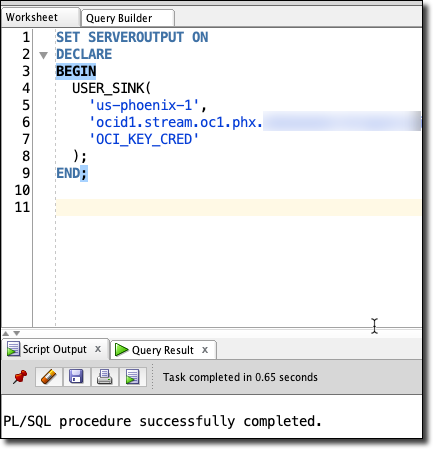
To call our stored procedure, we’ll use the following format (substitute your proper values for region, stream OCID and credential name):
SET SERVEROUTPUT ON
DECLARE
BEGIN
  USER_SINK(
    'us-phoenix-1',
    'ocid1.stream.oc1.phx...',
    'OCI_KEY_CRED'
  );
END;
If we were to manually run the procedure using the statement above before we have published any messages to our stream, it would run, but it would not result in any changes in our table. We’ll have to publish some messages to our stream in order to test that.
Publish Messages To Stream
Luckily, there’s an easy way to produce some test messages directly from our OCI console dashboard. Let’s try out an insert, update and a delete:
Publish A Few Messages To Insert Several Records
{
  "type": "INSERT",
  "value": {
    "id": null,
    "username": "todd",
    "first_name": "Todd",
    "middle_name": "Bartholemew",
    "last_name": "Sharp",
    "age": 43,
    "created_on": null
  }
}
{
  "type": "INSERT",
  "value": {
    "id": null,
    "username": "ray",
    "first_name": "Raymond",
    "middle_name": "Vader",
    "last_name": "Camden",
    "age": 45,
    "created_on": null
  }
}
We can publish these via the CLI or by using an SDK, but the easy way for test purposes is to login to our console dashboard and go into the details page for our stream.
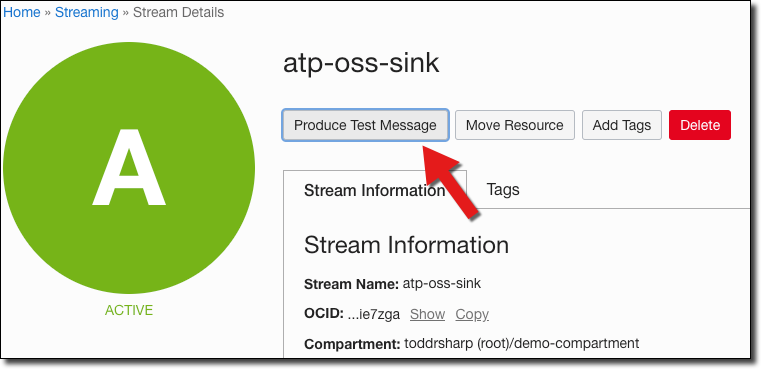
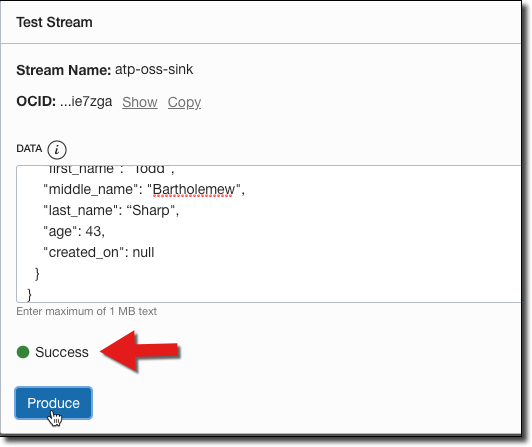
Paste the JSON in the ‘Produce Test Message’ dialog and click ‘Produce’ which will result in a success confirmation:
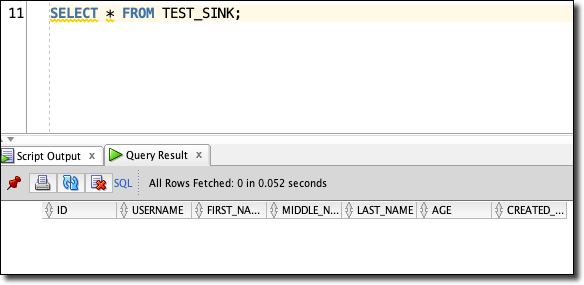
Before we run our procedure, double check that there are no records in the TEST_SINK table:
Now we can run our proc:
And check the table again:
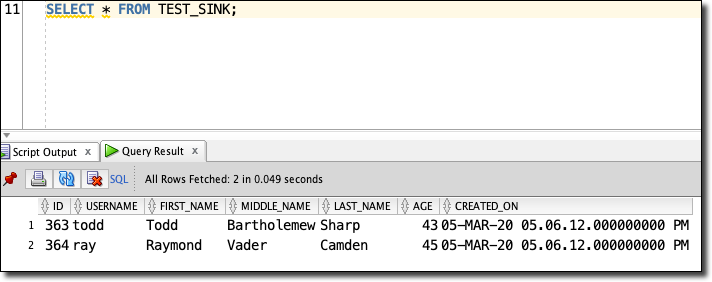
We’ll see our 2 new records!
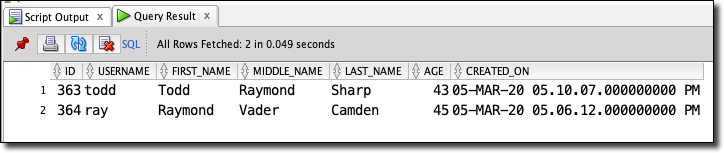
Publish A Message To Update A Record
We can also update an existing record:
{
  "type": "UPDATE",
  "value": {
    "id": 363,
    "username": "todd",
    "first_name": "Todd",
    "middle_name": "Raymond",
    "last_name": "Sharp",
    "age": 43,
    "created_on": null
  }
}
Publish A Message To Delete A Record
To delete we only need the ID:
{
  "type": "DELETE",
  "value": {
    "id": 364
  }
}
Next Steps
We’ve covered a ton so far - we’ve created cloud credentials in our DB, learned about streams and how to get started with streaming in the Oracle Cloud, learned about stored procedures and implemented a procedure to read from a stream and insert data into a table from that stream. The natural next step would be to use the scheduler in Oracle DB to schedule the execution of this procedure (or you could certainly invoke it via your application code).
Also, you’d want to enhance the exception handling capabilities to properly handle errors. I’ll use the blogger’s favorite cop out and say that I’m leaving that “as an exercise for the reader” when I really just want to end the post at this point.
Edit me...